Jewelry photo retouching refers to the transformation process with a retouching software where raw jewelry images turn into e-commerce-ready visuals. Retouching work includes fixing metal reflections, dust, scratches, dull gemstones, color inconsistencies, and misalignment; correcting colors, tones, appearances, and enhancing overall image quality.
Popular retouching software that image retouchers use includes Adobe Photoshop, Adobe Lightroom, Affinity Photo, ACDSee Photo Studio, and Capture One. These software offer retouching tools such as clipping paths, healing brushes, dodge & burn, and frequency separation to enhance jewelry ornaments to look towards realistic, high-quality, brand-consistent results.
What is Jewelry Photo Retouching?
Jewelry photo retouching is a specialized category of product image retouching where jewelry in images appears as real craftsmanship, refined and dazzling, without any flaws. Jewelry retouching involves several processing techniques, such as dust removal, scratch removal, reflection correcting, metal shining, gemstone brilliance editing, and shape and color adjustments for gold, silver, platinum, and diamonds.
Professional image retouchers make jewelry products appear polished, premium, consistent for e-commerce product listings, catalogs, social media posts, ad campaigns, etc.
Why is Jewelry Photo Retouching Needed for An E-commerce Site?
Jewelry image retouching is needed for an e-commerce website or online store to enhance raw product images and give them a premium look, reassuring buyers that the products are at their best. E-commerce stores show products in new condition to convince online buyers; retouching ensures products don’t contain dust, fingerprints, scratches, uneven color, glare, etc. It assures viewers of product quality for long-term usage.
Other reasons for e-commerce websites to hire professional retouchers are as follows.
- Match marketplace requirements (Amazon, Etsy, eBay, Shopify).
- Ensure products on white backgrounds appear with sharpness and accuracy.
- To retouch gemstone brilliance for diamonds, pearls, and stones to appear vibrant and luxurious.
- Maintain a consistent look across collections and different publishing platforms.
- Showing products in the true-to-life images.
- Reduce returns by displaying accurate color, size, shine, and texture.
- Boost conversion rates with clean and attractive product visuals.
What Types of Jewelry Products Should You Retouch?
The types of jewelry products you should retouch vary from single jewelry pieces, two-piece jewelry, to regular and occasional ornaments published in the e-commerce stores. Retouching enhances image quality and assures buyers of the product’s quality and longevity, contributing to conversion.
Here are 7 types of products that you should get retouched.
1. Single Jewelry Piece
You should get all single jewelry products, such as rings, earrings, bracelets, bangles, pendants, charms, and ornaments made of gold, silver, gemstone, to be retouched for making a flawless appearance, dust removal, shine enhancement, and perfect metal reflection.
2. Two-piece Jewelry
2-piece jewelry sets refer to matching earpieces, ring sets, and coordinated pieces. By retouching, you make sure those products appear symmetrical, well-balanced, and high-end through the photos.
3. Multi-product or Group Jewelry Pieces
In case of products with collections or bundle shots, show them in uniform lighting, spacing, and tone balancing. Editing can make those changes, which eliminates viewers’ confusion about the product’s quality.
4. E-commerce Jewelry Products
Retouch jewelry products made from both raw and artificial materials, which you sell on e-commerce marketplaces such as Amazon, Etsy, Shopify, and brand stores. Retouch makes products appear distinctive on white backgrounds, displays accurate colors, and sharp detail for online shoppers.
5. Multilayered & Oversized Pieces
Jewelry such as layered chains and complex designs requires retouching for their advanced textures and features to appear bold. Also, those products tend to create reflection; by getting those images edited, you can ensure professional-quality images for jewelry products.
6. Jewelry for Superimposing
You should get retouching for products that you want to be placed on models or other backgrounds. Retouchers will expertly place the product on your designed background, add shadows, and adjust other features for a natural appearance.
7. Jewelry Cleanup & Polishing
You need to retouch jewelry made of metal pieces or gemstones if they contain scratches, fingerprints, or oxidation. In this process, professional retouchers make a deep cleanup, removing those flaws and creating a look just like a new product.
What Types of Jewelry Photo Retouching Techniques Should You Apply?
The types of jewelry photo retouching techniques you should apply depend on the condition of the product in the images. Take an overall look at the images to see if they are good enough when compared with the competitors’ jewelry images.
Here are 11 types of image retouching techniques widely used in retouching.
1. Jewelry Resizing and Cleanup
Jewelry resizing and cleanup techniques are applied to adjust image size according to the e-commerce platform’s requirements. Cleaning means removing dust, noise, blur, etc, to ensure a professional look.
2. Jewelry Clipping Path
Jewelry clipping path is to create a vector path around the jewelry to extract the jewelry from the existing background or keep it transparent for use in a catalog or for superimposing.
3. Dust & Reflection Removal
Dust and unwanted removal technique eliminates micro-dust, glare, harsh reflections, fingerprints, and camera hotspots. It is essential to make metals and gemstones polished so that they naturally reflect their surroundings.
4. Background editing
Background editing refers to replacing or adjusting backgrounds to highlight the product. Products will appear in front of white, light gray, gradient tones, or transparent backgrounds, or any clutter-free background to fit commercial purposes and brand guidelines.
5. Shape and Symmetry Correction
Shaping and symmetry correction is the process to fix bent chains, uneven ring shapes, distorted earrings, misaligned settings, or asymmetrical pendants. By applying this technique, you get perfect and new images even if the original product images contain flaws.
6. Distraction and Flaw Removal
Jewelry images having strings, wax, stands, clips, fingerprints, scratches, oxidation spots, or reflections require application of distraction and flaw removal to ensure a consistent and professional look.
7. Color Correction
Color correction is applied to balance color tones, adjust metal hues, correct white balance, and recreate color variants of a single jewelry product. From gold to rose gold, silver to platinum, and gemstone, color correction techniques ensure color appearance remains uniform regardless of the screen size.
8. Metal and Gemstone Enhancement
Metal and gemstone enhancement is for enhancing jewelry’s brilliance, clarity, sparkle, and shine. It is applied to enhance textures and facets while keeping the finishing look realistic.
9. Shadow & Reflection Effect
Shadow and reflection effects are used for adding natural drop shadows, soft cast shadows, or mirror reflections. The results turn out mindblowing as they make the jewelry look grounded and three-dimensional on product pages.
10. Blemish and Spot Removal
Models wearing jewelry may contain subtle issues such as dents, pits, stone inclusions, tarnish, or tiny manufacturing flaws, or the model may not look good. Blemish and spot removal make those incongruences go away by editing the jewelry product images.
11. Creative Editing for Social Media
Creative editing includes stylized backgrounds, sparkle effects, color overlays, trendy layouts, lifestyle composites, etc, tailored for publishing on Instagram, Pinterest, Facebook, and ads to capture viewers’ attention.
What is the Best Jewelry Photo Retouching Software?
5 best jewelry photo retouching software are Adobe Photoshop, Adobe Lightroom, Affinity Photo, ADCSee Photo Studio, and Capture One. All these software offer resources for beginners, and still feature tools with the latest updates for retouching work.
1. Adobe Photoshop
Adobe Photoshop stays on top of any photo processing work, including retouching. It allows precise control over editing on each pixel, layers, masks, smart objects, and advanced retouching. Photoshop is ideal for both professional retouchers and advanced hobbyists. Photoshop offers plenty of resources to support beginner learners with creative control.
Retouching Features Photoshop Offers
- Spot healing & clone stamp for dust, scratch, and blemish removal
- Layer and mask-based editing for selective adjustments and a non-destructive workflow
- Precise color correction, hue/saturation adjustments, white balance, and color cast fixes
- Clipping path/background removal for e-commerce white/transparent backgrounds
- Reflection and glare removal for polished metal and gemstone surfaces
- Polishing and texture refinement to preserve detail
2. Adobe Lightroom
Lightroom is a light and streamlined retouching tool that prioritizes broad photo adjustments such as brightness, color balance, contrast, white balance, etc. Professional image retouchers use it for ‘raw tuning’. Beginners can learn it easily and use it for numerous photo editing tasks quickly.
Retouching Features Lightroom Offers
- Easy adjustment of brightness, contrast, highlights/shadows
- White balance and color cast corrections to adjust inconsistent lighting
- Batch processing/presets for consistent editing
- Basic spot removal/dust-busting tools
- Non-destructive editing keeps original files intact and quick export
3. Affinity Photo
Affinity Photo is a robust image editor whose features are comparable to Photoshop when it comes to retouching. Just by purchasing once, both new and expert users can use it for a lifetime. It might take some time, but learning it is worth it as experts appreciate its robust features and raw support.
Retouching Features Lightroom Offers
- RAW processing and color space control
- Full set of retouching tools: clone/heal, dodge & burn, frequency separation, for polishing metals and stones
- Non-destructive editing with layers, masks, and real-time adjustments
- Precise color correction and HSL adjustments
- Support for PSD files and smart-object compatibility
- Texture refinement, detail preservation, and advanced masking for clean, realistic results
4. ACDSee Photo Studio
ACDSee Photo Studio provides a solution for both processing and photo management. Its toolset is useful, and users with budget consciousness can consider using it. ACDSee photo studio is especially helpful for new users, hobbyists, retouchers, and small business owners who need small to medium-level project retouching solutions.
Retouching Features Lightroom Offers
- Basic and advanced editing tools: curves, levels, HSL adjustments
- RAW file support and lens correction (distortion, aberration)
- Batch processing and digital asset management
- AI-based denoise and automatic adjustments for quick cleanups
- Exposure, contrast, and brightness tweaks
- Cloud-sync or mobile sync (differs by version); effective for remote access or lightweight editing
5. Capture One
Capture One is a professional-grade image retouching solution that jewelry retouchers use for precise color control, layer-based editing, and tethered shooting. The free version has a learning curve for beginners; however, the paid version is ideal for advanced users with full control to support high-end retouching workflows.
Retouching Features Capture One Offers
- Layer-based adjustments for selective edits
- Precision masking for detailed product edges
- Noise reduction without losing texture
- Batch processing for large e-commerce catalogs
- Advanced color grading and skin/metal tone correction
- Clarity and structure tools for enhancing gemstone brilliance
Can AI Tools Replace Manual Jewelry Photo Retouching?
AI tools cannot replace manual jewelry photo retouching, considering the fact of creativity, brand-specific custom requirements, and situational judgment. When performing any editing, human editors process the editing from a different perspective to fulfill clients’ requirements, commercial goals, and the target audiences’ preferences. AI only follows what it is ordered or instructed to do.
When the retouching approach merges both human editing and AI support, you can produce quality images. AI still struggles to differentiate colors, macro-detail editing, and artistic judgment, which calls for professional retouchers to take care of.
Take a look at the retouching tasks that you can use AI for and where you should hire retouchers.
| Tasks You Cn Use AI for | Tasks You Can Use AI for |
|---|---|
| Basic editing, such as dust, scratch, and blemish removal | Controlling metal reflections or complex reflections in gold, silver, and platinum |
| Background removal and easy color correction | Adjusting gemstone brilliance, fire, and faceting |
| Generating multiple size variants for marketplaces | Preserving micro-texture |
| Auto-enhancing brightness, contrast, and white balance | Fixing asymmetry, bent elements, or shape distortions |
| Batch-processing for repetitive tasks | Jewelry superimposing |
How to Retouch a Jewelry Photo?
Here is the step-by-step guide to retouching a jewelry photo. I have included the necessary tools so that you can learn through your software.
Step 1: Duplicate your working file to start the process.
Open RAW/high-resolution images into your software and create a copy. For example, duplicate the base layer if you are using Photoshop or create a Virtual Copy for Lightroom.
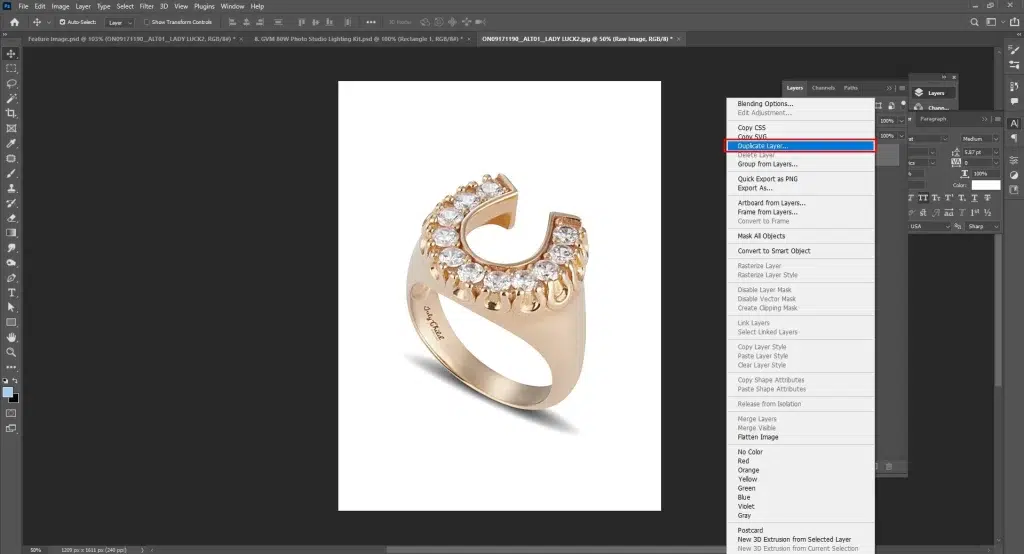
Working on another copy protects the original, and edits remain non-destructive.
Step 2: Resize and frame the product in the image
Define the frame of your jewelry images. Crop it as per the required dimensions using the Crop Tool. Then align twisted or angled jewelry with Transform → Warp/Perspective.
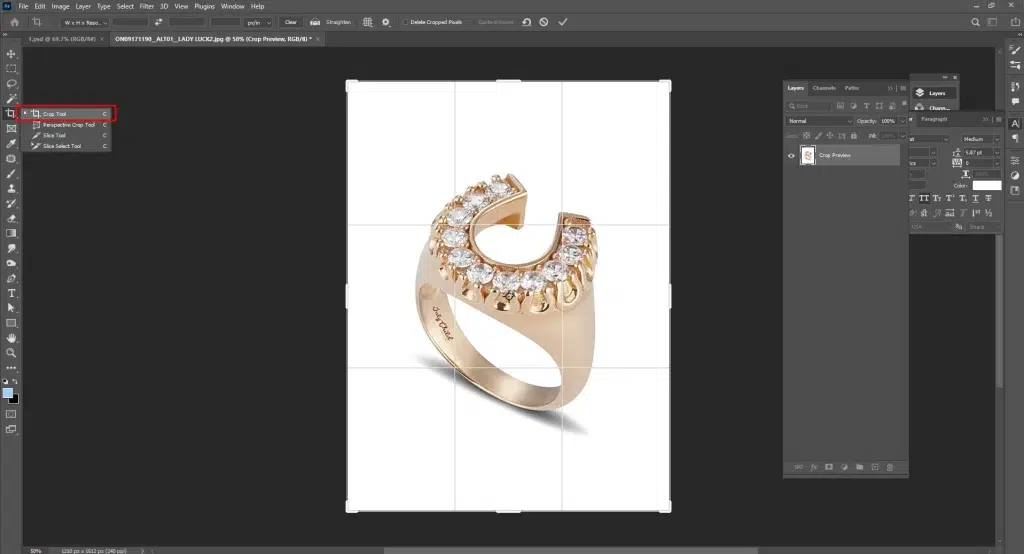
If you are using Lightroom, use the Straighten Tool. Place the jewelry in the center for visual balance.
Step 3: Apply Global RAW adjustment
Now fix the overall white balance, exposure, contrast, highlights/shadows, and basic noise reduction. It will create a clean base before editing pixels.
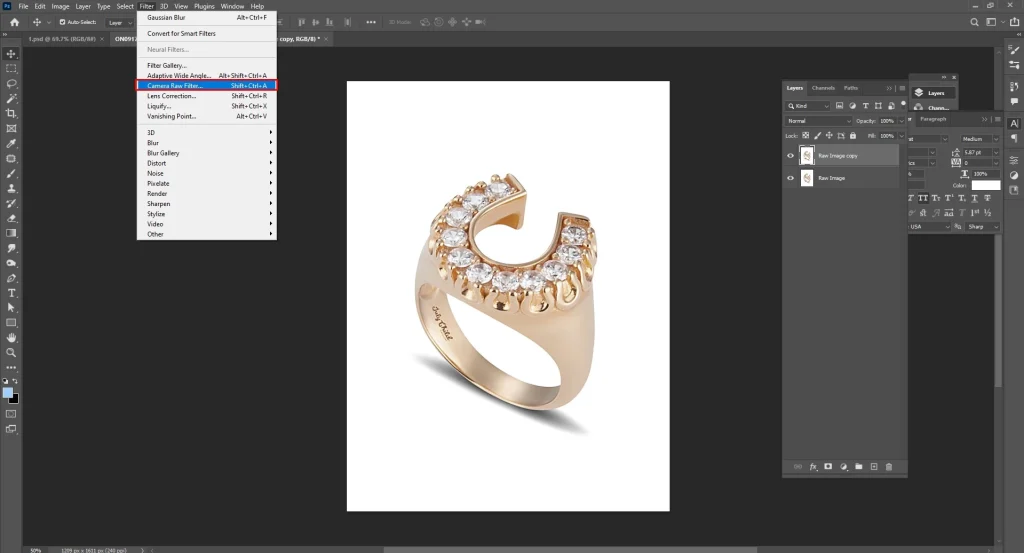
- Correct base tone: Use the Develop/Basic panel sliders or Camera Raw.
- Neutralizing color casts from studio lights: Use the White Balance Eyedropper.
Step 4: Isolate the subject
Make a precise selection with the Photoshop pen tool.
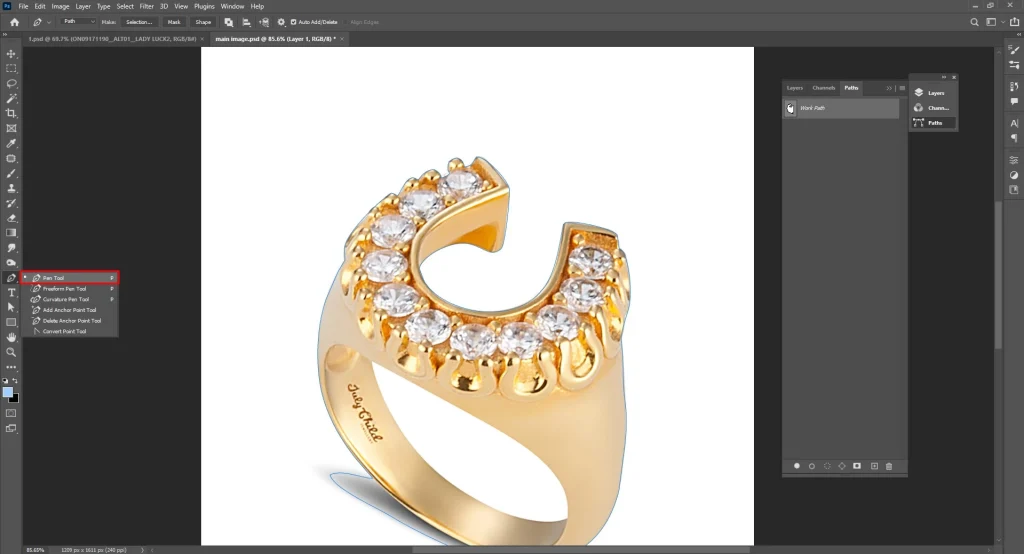
For hard-edge products such as necklaces or rings, draw a clean Clipping Path with the Pen Tool. Use Select Subject → Refine Edge/Mask and refine edges with the Refine Edge Brush to select faster. Then, remove or replace the background using the same mask.
Step 5: Remove distractions and flaws
Zoom the jewelry image 100–300% to find microflaws. To remove imperfections, use a small soft brush (3–10 px) on the Healing Brush for specks and a larger Clone Stamp at 30–60% opacity for scratches.
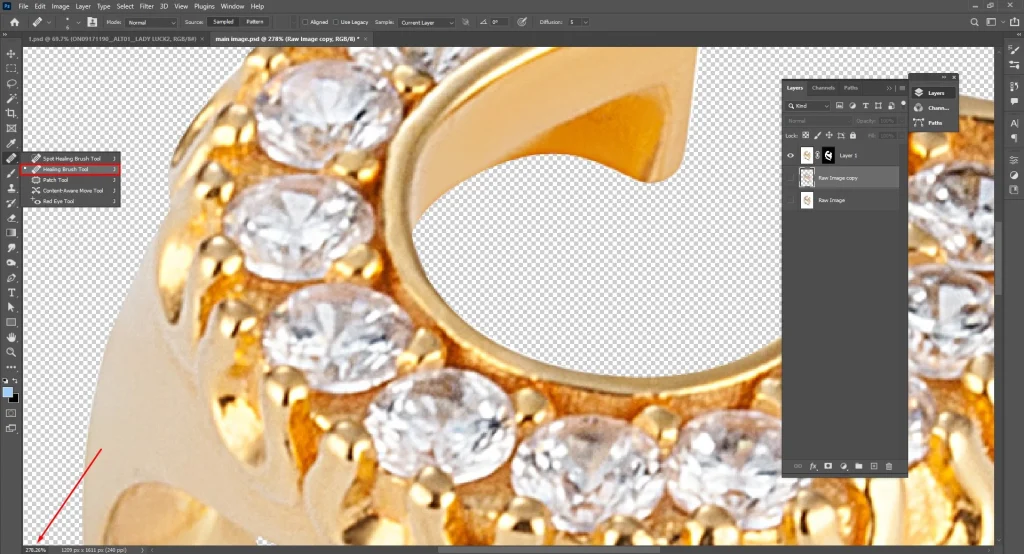
In Lightroom or ACDSee, use the Spot Removal/Heal Brush for similar cleanup.
Step 6: Adjust shape, reflection, and retain details
Check the image for misalignment; rectify it by pushing metal edges using Liquify → Forward Warp Tool or Transform Warp.
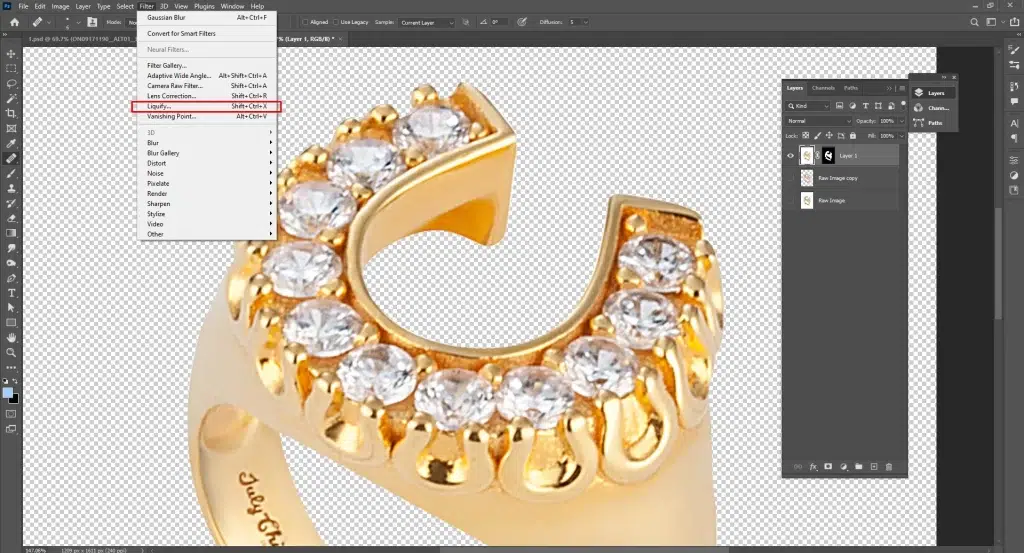
Now, use the Frequency Separation Tool to heal color on the low-frequency layer. Once done, fix the texture with the Clone Stamp on the high-frequency layer.
Control hotspots by using a soft Dodge & Burn brush at 2–5% flow in Photoshop or Radial/Brush Adjustments in Lightroom. Enhance metals with Curves and sharpen gemstones using a small High-Pass Filter (1–3 px).
Step 7: Make final correction
Make the jewelry piece more realistic by adding a realistic drop shadow using a soft brush (at 10–20% opacity) + Gaussian Blur and a subtle mirror reflection. Follow this step to add a reflection.
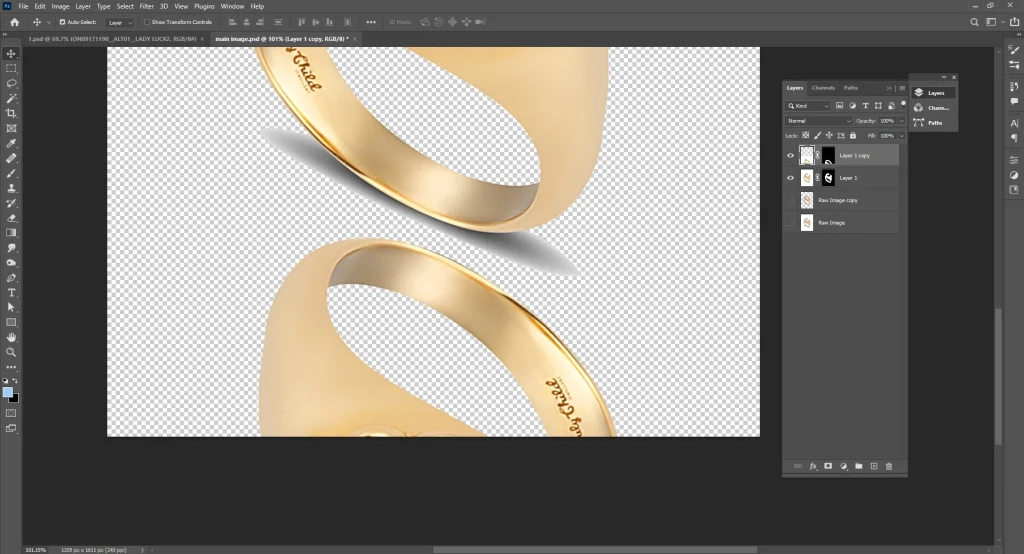
- Duplicate the jewelry layer
- flip it vertically
- Soften with a mask
- reduce opacity
When shadows and reflections are added, apply color grading with Curves or Hue/Saturation. Do selective sharpening on the jewelry using the High-Pass layer set to Overlay. Refrain from sharpening the background.
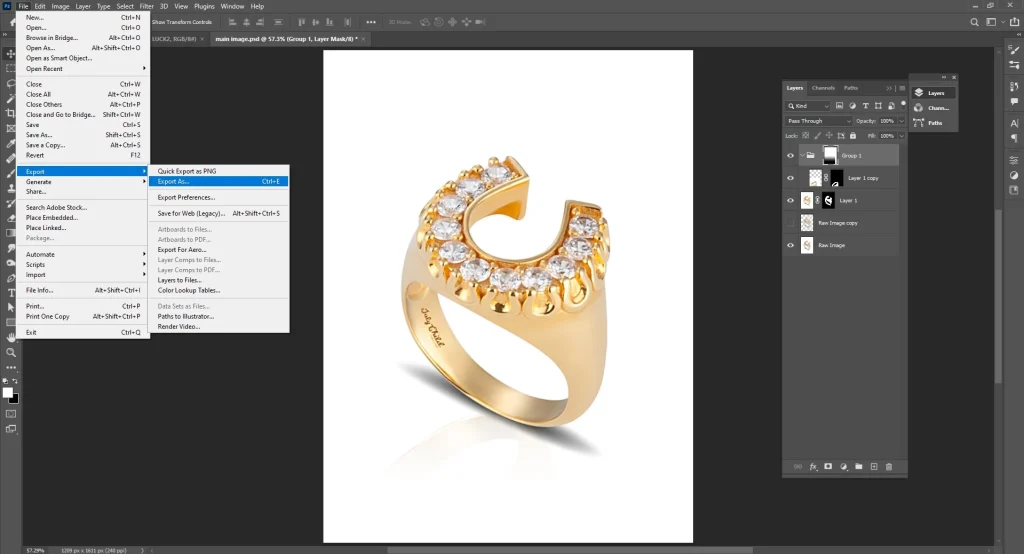
Step 8: Export the file
Convert the final file to sRGB. Then resize it as per the publishing platform requirements, and an expert in JPEG or PNG files. Store the layered PSD for later usage.
What to Look for When Outsourcing Jewelry Photo Retouching Services?
When outsourcing jewelry photo retouching services, look for their service category, photo quality through portfolio, years of experience, turnaround, and pricing. Understanding photo retouching factors ensures your product photos look consistent, polished, and commercially ready for any marketplace.
- Service Category: Look into what they offer, from basic to advanced to creative and specialized jewelry retouching services.
- Portfolio: Review their sample works, or check the gallery to confirm their work style. Check image quality, sharpness, color accuracy, and realistic metal/gemstone detailing to see if they look professional.
- Years of Experience: Choose an outsourcing team with proven expertise in the image retouching industry. They are adept at handling complex jewelry products, which will benefit you in the long run.
- Turnaround Time: Learn their project delivery system, methods, and how they process small, bulk, and urgent orders without sacrificing quality.
- Pricing: Look for transparent, scalable pricing that fits your e-commerce volume and quality expectations.
How Much Does Jewelry Retouching Service Cost in the USA?
Jewelry product retouching service cost starts around $0.60 per image in the USA. The pricing varies based on whether an outsourcing agency or hiring individual retouchers. Other factors, such as retouching type (basic to advanced), project volume, complexity, and turnaround, also impact the retouching service price.
What are the Common Challenges in Jewelry Photo Retouching?
Some common challenges in jewelry photo retouching include harsh reflections on metals, distorted shapes or misaligned pieces, gemstones in images looking dull or flat, inconsistent metal color tones, and the appearance of dust and micro-scratches.
Challenge 1: Harsh Reflections on Metals
Jewelry photos mostly come with Jewelry metal reflections. Ornaments made of gold, silver, and platinum reflect light, surroundings, or a person’s silhouette, etc.
Solution: Use Clone Stamp (low opacity) and Dodge & Burn to soften harsh spots.
Challenge 2: Distorted Shape or Misaligned Pieces
Jewelry products such as chains, rings, and earrings may appear lean, twisted, and misaligned during a photoshoot.
Solution: Adjust the shape by using Liquify, Warp, or Puppet Warp. Try preserving realism while creating the perfect symmetry.
Challenge 3: Gemstones in Images Look Dull or Flat
Stones like diamonds, pearls, or emeralds may appear uninteresting due to the camera’s flattening of sparkle and lack of clarity.
Solution: Use local contrast, vibrance, and subtle Dodge on gemstone facets.
Challenge 4: Inconsistent Metal Color Tones
Raw jewelry may show color inconsistency, for example, gold as yellow, silver as blue, rose gold as orange or reddish, etc.
Solution: Use tools like Selective Color, Curves, and Hue/Saturation to rectify color tones.
Challenge 5: Appearance of Dust and Micro-scratches
Shots from a macro lens and high-resolution images disclose every imperfection, even the ones invisible to the naked eye.
Solution: Use the Healing Brush, the Spot Healing, and the Patch Tool at 100–300% zoom to clean the surface. Use a soft 3–10 px brush for precision cleanup.
FAQ’s
What is the difference between basic and advanced jewelry retouching?
The difference between basic and advanced jewelry retouching is the editing level. Basic retouching focuses on simple and repetitive adjustments such as resizing, dust removal, color correction, exposure correction, background cleanup, etc. Advanced retouching prioritizes high-precision and intricate works such as metal and gemstone polishing, complex reflections, symmetry correction, frequency separation, etc, to produce luxury-grade visuals.
How does color correction impact jewelry photo retouching?
Color correction impacts jewelry photo retouching by bringing out the original colors of the products. The appearance of metals and gemstones mimics their real-life tones. Color correction fixes hues, dullness, or color casts in product images. It works as a base for advanced-level color retouching, resulting in consistent and on-brand content.
Why do jewelry photos need heavy cleanup even after a studio shooting?
Jewelry photos need heavy cleanup even after a studio shooting because those products attract dust, fingerprints, micro-prints, which become apparent in the pictures, if shot with macro lenses. Heavy cleanup eliminates those flaws and imperfections, highlights products, makes them shine, and removes glare or unwanted reflections. It results in products displayed in pristine detail across all publishing platforms.
Why do gemstones look dull before retouching?
Gemstones look dull before retouching because of camera reflections, and lighting angles don’t do justice; gemstones don’t shine as they look off-camera. Retouching makes gemstones appear dazzling, restores brilliance, and improves product clarity.