
E-commerce photo retouching enhances product images for detailing, accuracy, and higher conversions. The vast genre of e-commerce image retouching ranges from product polishing, model & beauty retouching, background editing, to niche-specific adjustments using advanced Photoshop tools and brushes. Professionally retouched images look high-quality and consistent enough to drive sales, build trust, and reduce returns in the competitive online marketplaces.
What you’ll learn in this article
What is E-commerce Photo Retouching?
E-commerce photo retouching is the photo-enhancing process of product images to make them spotless, precise, consistent, and realistic. Professional image retouchers use Adobe Photoshop, Adobe Lightroom, DXO Photolab, Capture One Pro, etc, to apply color correction, dust removal, shape fixing, and background adjustment, shadow creation to ensure retail-ready visuals.
Image retouching improves product visuals in the following ways.
- Enhances product clarity and visual appeal.
- Ensures consistent branding across all listings.
- Helps eliminate viewers’ confusion and leads them to the CTA.
- Improves conversion rates and reduces returns.
- Builds credibility on the product and brand by showing realistic images.
What’s the Difference Between E-commerce Photo Editing and Photo Retouching?
The difference between e-commerce photo editing and photo retouching is the application level of changes in images. E-commerce photo editing covers all types of editing from basic to advanced, such as cropping, resizing, white background, etc. Photo retouching refers to the specialized type of retouching that covers refining colors, textures, and imperfections for an eye-catching, refined look.
Other differences between e-commerce editing and image retouching are as follows.
| Topic | E-commerce Photo Editing | Photo Retouching |
|---|---|---|
| Purpose | Follows the platform’s guidelines for quality visuals | Prioritize quality and visual accuracy for all publishing platforms |
| Included Tasks | Cropping, resizing, and background removal | Subject appearance improving, texture or skin smoothing, color refinement |
| Depth of Work | Mostly surface-level adjustments | Detailed and pixel-level refinement |
| Required Time | Faster and repetitive | Slower and precise |
| Goal | Consistent and professional look | Premium, polished look |
Why Do E-commerce Businesses Need Photo Retouching?
E-commerce businesses need photo retouching for clear product presentation to attract customers and boost conversion. Professional retouching ensures products appear polished, consistent, and accurate across listings on different screens. A 2025 blog by Grab On titled 50+ eCommerce Product Photography Statistics (2025), it is stated that 9 out of 10 online shoppers deem high-quality product photos as one of the most important purchasing factors. The boost look of products helps eliminate viewers’ confusion, builds their trust in the product and brand, and turns them to become loyal customers.
Other reasons for businesses to need image retouching are as follows.
- Retouch makes the product appear clean, professional, and appealing.
- It creates uniform visuals across platforms and maintains brand consistency.
- Retouching makes an accurate representation of products, cheating reliability.
- Professionally retouched photos increase sales and conversion rates.
- It reduces buyers’ confusion and contributes to reducing returns.
- Polished images perform better in ads, social media, and promotions.
How Photo Retouching Improves Product Sales?
Photo retouching improves product sales by transforming product images into visually compelling assets to attract attention and build trust. Each retouched image shows products along with telling an emotion or a story to resonate with the buyers’ needs. By enhancing colors, textures, and clarity while removing imperfections, retouchers ensure products look accurate and desirable. So, when buyers see the photos, they trust the products and manufacturers/brands and make the purchase.
What Types of Products Need E-commerce Photo Retouching?
Every type of product needs e-commerce photo retouching, as this has become a standard not only among the sellers but also for the buyers. They believe e-commerce brands maintain quality, as shown with their photos. E-commerce photo retouching thus exceeds all types of products that sell outside that platform.
Here are 10 common product types that need e-commerce image retouching.
1. Fashion Product Retouching: It covers clothing, shoes, eyewear, bags & accessories, makeup and cosmetics, and model photos.
2. Electronic Gadget Retouching: It includes smartphones, laptops, tablets, smartwatches, headphones, gaming devices, etc.
3. Luxury Product and Jewelry: It encompasses rings, bracelets, necklaces, gemstones, watches, luxury metals, and high-end accessories, with a strong focus on jewelry photo retouching to enhance brilliance, detail, and premium appeal.
4. Furniture & Home Décor Retouching: Products include sofas, chairs, beds, lamps, décor items, carpets, and kitchenware.
5. Food & Beverage Product Retouching: Products cover packaged foods, beverages, canned items, fresh produce, baked goods, frozen items, condiments, and snack packaging.
6. Automotive Parts & Industrial Product Retouching: Products cover car accessories, engine parts, tools, mechanical components, machine parts, and hardware items.
7. Sports, Outdoor & Fitness Product Retouching: Products include fitness equipment, activewear accessories, camping gear, outdoor tools, cycling products, and yoga accessories.
8. Lifestyle & Daily Essentials Retouching: Products include sports gear, stationery, household items, self-care items, pet products, travel accessories, and baby products.
9. Kitchen & Appliance Product Retouching: Kitchen appliances, storage containers, cookware, utensils, stainless-steel items, small gadgets, etc.
10. Medical, Health & Wellness Product Retouching: Essential products are supplements, medical devices, OTC medicines, wellness tools, hygiene products, and first-aid items.
What Types of Photoshop Retouching Tools are Used in Professional Retouching?
In professional retouching, soft round brushes, hard round brushes, healing brushes, clone stamp brushes, etc, are mostly used. Professional retouchers rely on a mix of corrective, enhancement, and refinement tools in Photoshop to achieve clean, realistic product images. These retouching tools help fix flaws and imperfections, control color, adjust textures, and create fine visuals without over-editing.
1. Soft Round Brush
A soft round brush is ideal for Dodge & Burn, smooth transitions, soft shadow adjustments, and gentle tonal shaping without leaving harsh edges.
2. Hard Round Brush
A hard round brush is used for precise cleanup, edge refinements, sharpening small details, and controlled painting on masks.
3. Spot Healing Brush Tip
The spot healing brush tool is used for quick skin cleanup, texture fixes, and removing small marks while blending seamlessly.
4. Clone Stamp Brush
A clone stamp brush replaces skin or product textures while preserving natural detail; ideal for precision retouching.
5. Soft Round Pressure-Opacity Brush
Soft round pressure brush helps build light and color gradually; perfect for micro-dodge & burn and subtle luminosity adjustments.
6. Hard Round Pressure-Size Brush
The hard round pressure brush is great for hair detailing, edge cleanup, and controlled line work where size variation is needed.
7. Texture/Grain Brush
Texture or grain brush adjust facial features by restoring skin pores, fabric detail, and natural texture after smoothing or frequency separation.
8. Eye Detail Brush
Eye detailing brush enhances iris clarity, catchlights, lashes, and micro-contrast around the eyes without making them look artificial.
9. Hair Strands Brush
A hair strand brush is used for recreating flyaway hairs, fixing gaps, and adding realistic volume or density during beauty retouching.
10. Skin Smoothing Brush
Skin smoothing brush is applied in low-flow settings to even out tones, soften transitions, and blend color inconsistencies while keeping pores intact.
What are the Common Techniques Used in E-commerce Photo Retouching?
There are plenty of techniques used in e-commerce photo retouching that often vary by subject, their structure or manufacture, material, finishing, etc. If the shooting involves models, then the retouching techniques slightly shift to a human-focused way. Taking notes of all retouching techniques, they fall into 6 major common techniques as follows.
1. Product Photo Retouching
Product photo retouching focuses on clear product surfaces, correcting colors, and removing imperfections to create clean, retail-ready photos to marketize. It is about clarity for which photo editors enhance material details, fix shape distortions, and polish textures so every product looks consistent, clear, and brand-specific across e-commerce platforms.
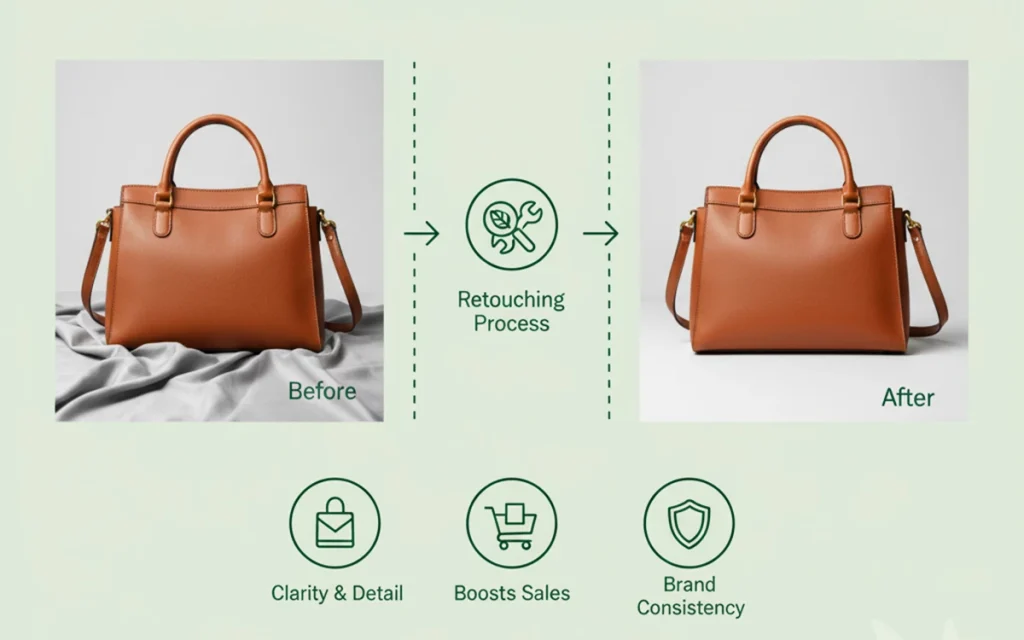
The following techniques are applied to retouch e-commerce product photos.
- Product appearance adjustments
- Texture and material refinement
- Dust and wrinkle removal
- Color and contrast correction
- Shadow and reflection cleanup
- Product shape correction
- Imperfection cleanup on materials
- Solid background stretching
2. Model & Glamour Photo Retouching
Model and glamour retouching is mostly about enhancing human features to highlight the product’s impact and evoke the urge to purchase products. Model photo retouching shows glamour or beauty, informs about trends, and makes viewers conscious. The retouching techniques thus prioritize a natural, confident look on the model’s features. Retouchers keep their natural facial features and look intact while improving overall clarity and appeal, especially for fashion, beauty, and lifestyle e-commerce visuals.
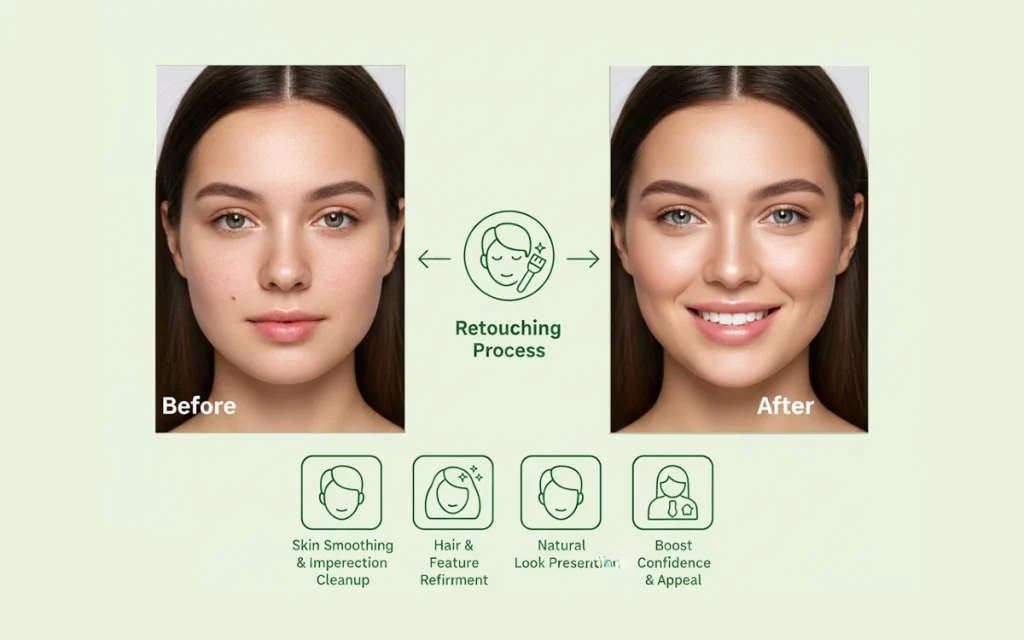
Model and glamour photo retouching includes the following techniques the most.
- Skin smoothing and complexion balancing
- Acne, scars, and bump removal
- Wrinkle and age-appropriate touch-ups
- Freckle and natural mark preservation
- Loose hair strand removal
- Teeth whitening and proportion balancing
- Face and body contour refinement
3. Beauty & High-End Retouching
Beauty and high-end retouching techniques are advanced, with detailed editing for premium products, cosmetics, and visuals for brand campaigns. The process involves high-end retouching methods to create refined, magazine-style or printing-worthy results while keeping textures realistic and avoiding artificial or over-edited looks.
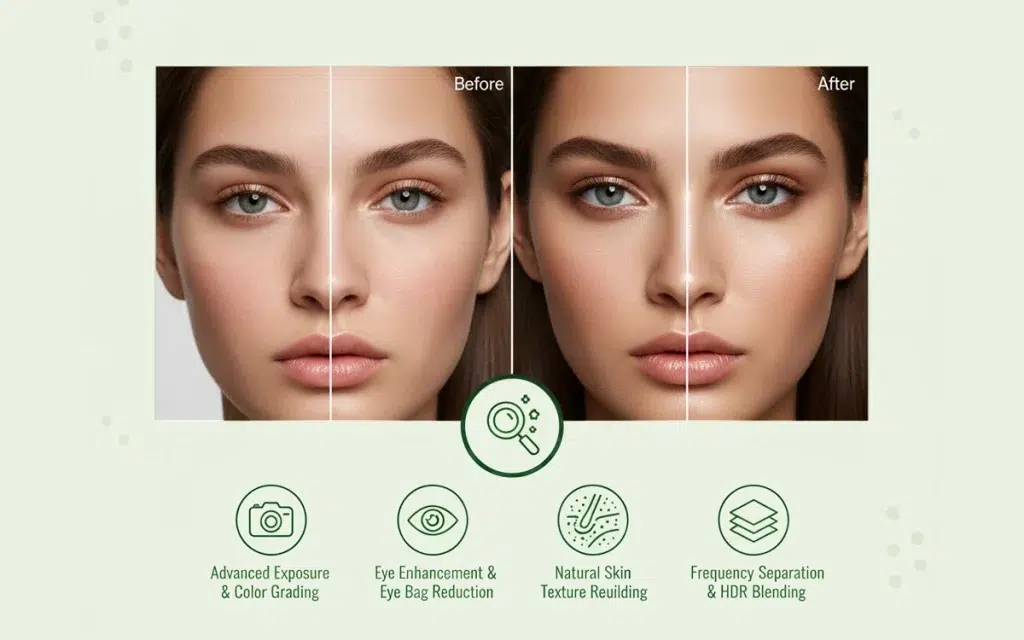
Some of the beauty and high-end retouching techniques are as follows.
- Advanced exposure balancing
- High-end color grading
- Eye bag reduction
- Pixel-level eye enhancement
- Natural skin texture rebuilding
- HDR exposure blending
- Frequency separation for natural texture
4. Background Adjustments
Background editing techniques refine the scenery around the subject by removing distractions and building new environments to make the subject clean and professional. Image editors use framing, remove unwanted objects, change colors, replace scenarios to create balanced visuals, and highlight the subject as the main focus.
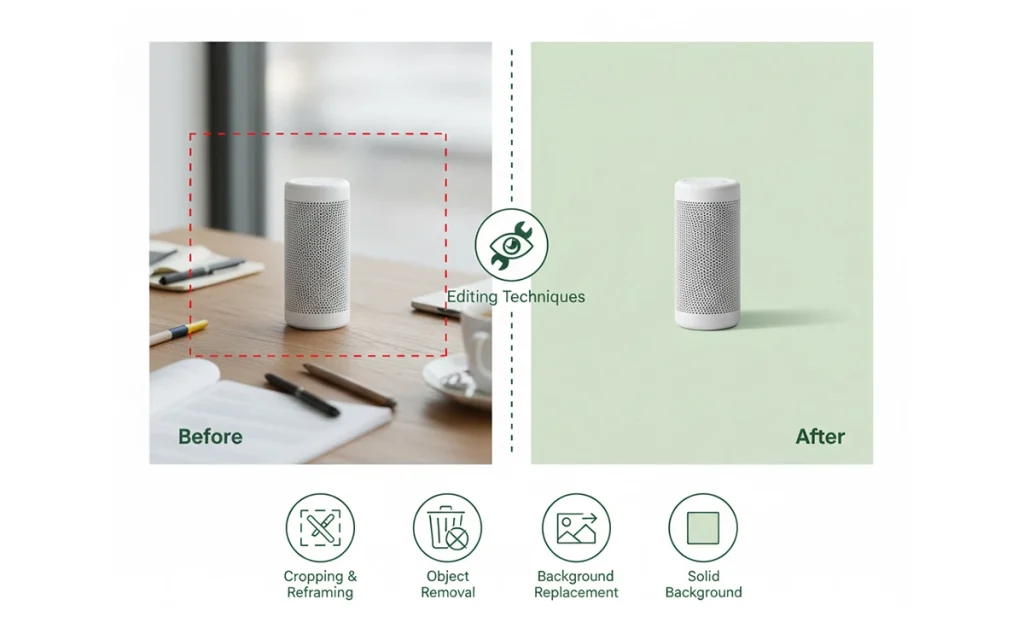
Some of the background editing techniques involve the following ones.
- Solid background expansion
- Image cropping and reframing
- Object and distraction removal
- Compositing people accurately
- Background replacement or merging
- E-commerce white background adjusting
- Scene and context-appropriate backdrop alignment
5. Niche-Based Retouching
Niche-specific retouching techniques are solely to fulfil online and e-commerce businesses’ specific needs, depending on their industry. It includes unique color handling, texture preservation, brand guideline following, artistic approaches, etc. For example, hand-made jewelry, newborn photography, portrait photography and retouching.

Niche-based retouches cover various techniques as follows.
- Portrait detailing
- Headshot cleanup
- Jewelry sparkle enhancement
- Newborn skin refinement
- Brace removal and teeth shaping
- Material-specific color correction
- High-precision detail balancing
6. Creative Manipulation of Images
Creative manipulation techniques include the use of presets, surrealism, and reshaping or rebuilding elements within an image to meet the brand’s purpose or storytelling goals. The process involves combining multiple photos, adding or swapping people’s limbs, and developing seamless visuals with realism and authenticity.
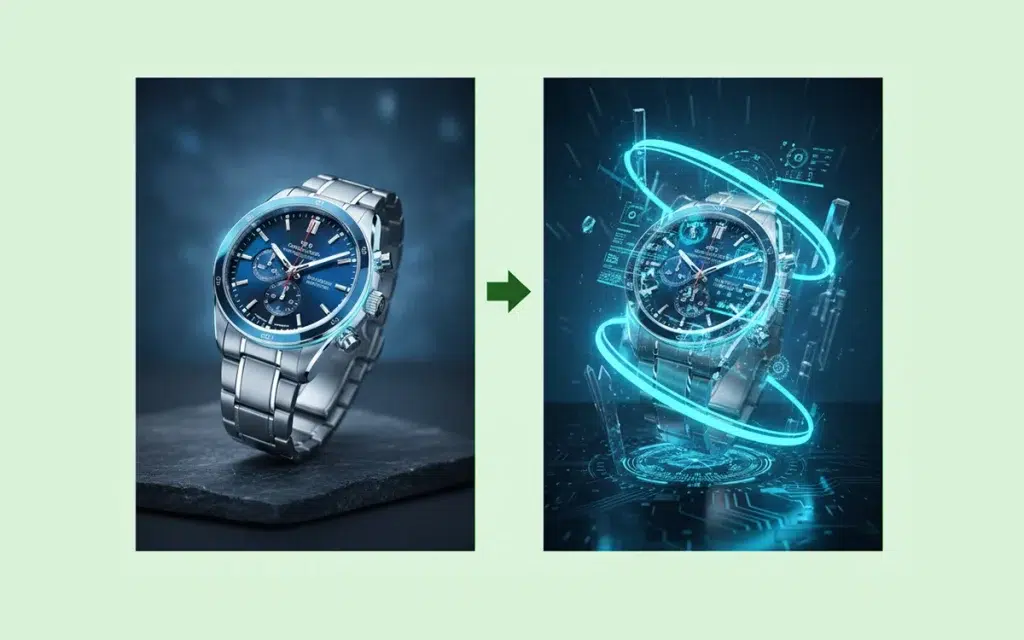
Creating manipulation techniques involved the following ones.
- Multi-image compilation
- Head replacement
- Proportion correction
- Perspective and alignment fixing
- Limb or posture adjustments
- Body part and facial feature swapping
How Much Does E-commerce Image Retouching Cost?
E-commerce image retouching cost starts around $0.60 and can go as high as $3.99 per image or more. It changes depending on what type of retouching you need, the project volume, and their complexity level, number of images, agency or individual photo retouchers, their skill and expertise, etc.
| Category | Works | Cost |
|---|---|---|
| 1. Basic photo retouching | Basic correction, model photo correction, product polishing, image cropping, etc. | $0.60 |
| 2. Professional/medium photo retouching | Headshot retouching, people adjustment, body swapping, background modification, etc | $1.9 |
| 3. High-end photo retouching | Clipping path, pixel-level retouching, beauty correction, HDR effects, etc. | $3.99 |
| 4. Custom photo retouching | Tailored solutions for online businesses |
FAQ’s
How is AI changing e-commerce photo retouching?
AI is changing e-commerce photo retouching by handling repetitive tasks in a faster output, only through instructions. Saving time on easier tasks, AI makes photo retouching team efforts and workflow faster. As a result, they can focus and consistently perform at an advanced level and produce precise work, producing brand-oriented visual content.
What are the latest trends in e-commerce product photo retouching?
Some of the latest trends in e-commerce photo retouching are minimalist style, natural textures, multi-angle edits, 360-degree photo edits, realism, and true-to-life colors etc.
What are the challenges in e-commerce product retouching?
The challenges in e-commerce product retouching are a lack of color accuracy, an imbalance of natural textures, misalignment in speed with quality, mismanagement of diverse product materials, and not following platform-specific requirements.
How do professional editors ensure realistic results in e-commerce photo retouching?
Professional editors ensure realistic results in e-commerce photo retouching by following a calibrated workflow, preserving product texture, and using controlled lighting references. They also refrain from over-editing and cross-check images across several screens before submitting them to the clients.