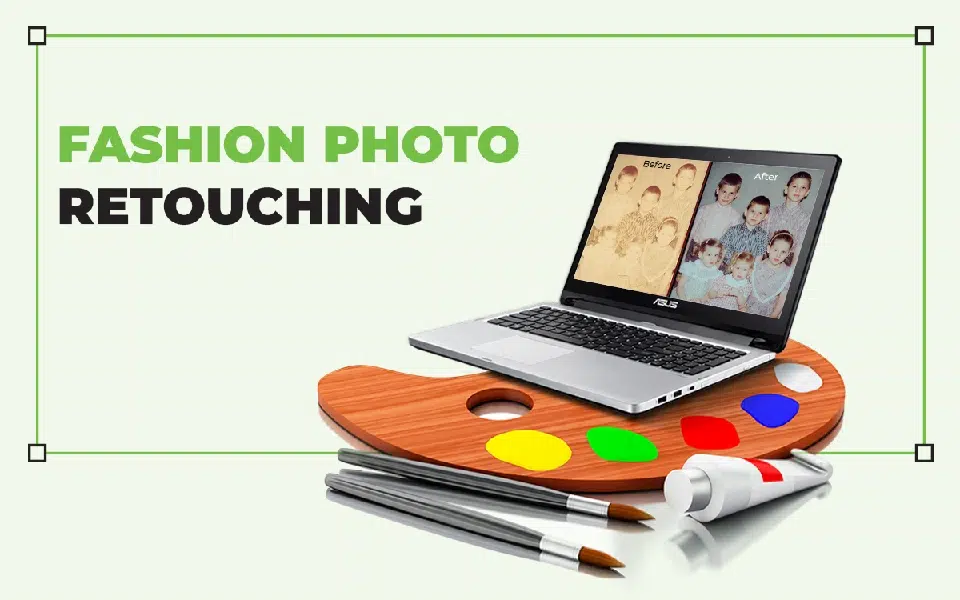
Fashion photo retouching refers to the retouching work applied to clothing, shoes, jewelry, sunglasses, and other fashion accessories, along with modeling photos. The purpose of retouching fashion images is to make them glamorous and convincing to introduce trends, make products appear lucrative, and boost product sales.
Professional photo retouchers implement different types of photo retouching techniques such as color grading, body swapping, beauty correction, HDR effect, photo compilation, etc, to create high-end images. The cost of fashion photo retouching starts at $0.60. Though manually editing takes intensive time, relying on AI retouching to get high-quality photos compromises image quality and reliability.
What you’ll learn in this article
- 1 What is Fashion Photo Retouching?
- 2 What are the Advanced Fashion Photo Retouching Techniques?
- 2.1 1. Clipping Path
- 2.2 2. Advanced Color Grading
- 2.3 3. Photo Compilation
- 2.4 4. Swapping Body Parts
- 2.5 5. Teeth Adjustment
- 2.6 6. People Placement
- 2.7 7. Beauty Correction
- 2.8 8. Extensive Eye Retouching
- 2.9 9. HDR Effects
- 2.10 10. Dodge and Burn for Depth and Dimension
- 2.11 11. Hair Retouching and Detailing
- 2.12 12. Advanced Sharpening
- 2.13 13. Gradient and Vignette Effects
- 2.14 14. Background Replacement and Refinement
- 3 What is the Fashion Photo Retouching Workflow?
- 4 How to Retouch Skin in Photoshop?
- 4.1 Step 1: Open the Image File in Photoshop
- 4.2 Step 2: Duplicate the layer
- 4.3 Step 3: Clean up the Flaws
- 4.4 Step 4: Smooth the Skin with Frequency Separation
- 4.5 Step 5: Restore Shape with Dodge & Burn
- 4.6 Step 6: Rectify Uneven Color Tones
- 4.7 Step 7: Sharpen the Details
- 4.8 How Do Professionals Use Photoshop Layers and Masks for Fashion Photo Retouch?
- 5 Why Should You Use Hand-Drawn Fashion Photo Retouching Instead of AI?
- 6 Can Fashion Photo Retouching Techniques Be Used in E-commerce?
- 7 How Much Does Professional Fashion Photo Retouching Cost?
- 8 FAQ’s
What is Fashion Photo Retouching?
Fashion photo retouching is a specialized category of photo processing that enhances fashion products, accessories, and model portraits to create a visually consistent, professional, and attractive appearance. It includes color correction, sharpening, brightness adjustments, skin and complexion enhancements, and texture improvements.
Expert retouchers take perceptive measures in the editing process to align with brand aesthetics and marketing requirements. Your subjects look premium, polished, and trustworthy in images. Retouched photos improve click-through rates, boost customer confidence, and deliver a positive shopping experience.
How Does Fashion Photo Retouching Help Increase Online Clothing Sales?
Fashion retouching helps increase online clothing sales through enhancing photo quality, ensuring the right size and format, highlighting product features, and maintaining brand guidelines. A 2024 article published in BusinessDasher, headlined 9 Importance of Product Photography Statistics in Ecommerce reveals that high-quality product photos had a 94% higher conversion rate than low-quality photos. Well-retouched images reduce image returns and support the product’s online visibility, contributing to sales in the long run.

- Enhances photo quality
Fashion retouching improves the appearance and quality during digital publication. It shapes the product’s details and provides clarity for the customers.
- Ensures the right size and format
Retouching works make images fit for the publishing platforms with the right aspect ratio, size, and format so that those images load fast and rank well in Google Shopping.
- Highlights product features
Image processing highlights apparel products’ features, enhances textures, colors, and appearances through normal shots and close shots. Online shoppers can check and zoom products to decide to buy.
- Maintains brand guidelines
By outsourcing image retouching, brands can ensure their product images appear uniform across all platforms to strengthen brand identity.
- Reduce image returns
Retouching improves photo quality, reduces flaws and distractions, making the product similar to the original product. It boosts buyers’ confidence to purchase and reduces returns.
- Support the product’s online visibility
High-quality images are perfect material for marketing and driving position to SERP, feature snippets, and online visibility.
What are the Advanced Fashion Photo Retouching Techniques?
There are 14 types of advanced retouching techniques used in photography post-production, which include beauty correction, eye retouching, photo compilation, and swapping body parts etc. Advanced photo retouching involves merging several techniques to fulfill images’ creative, business-oriented, and custom purposes.
| Retouching Techniques | What It Includes |
|---|---|
| Clipping path | Subject isolation, add or remove background, and create merged images. |
| Advanced color grading | Adjusting tone curves and color balance, brand-defined color styles, enhancing fabric vibrancy without oversaturation, etc. |
| Photo compilation | Adding multiple images (ghost mannequin, adding outside elements, etc. |
| Swapping body parts | Smooth transition of body, facial features, eyes, and heads. |
| Teeth adjustment | Teeth editing, teeth whitening, and brace removal. |
| People placement | Removing or including people in the photos. |
| Beauty correction | Adjusting advanced level techniques, frequency separation to skin tone & texture refining. |
| Extensive eye retouching | Eye bag removal, eye swap, eye enhancement, and eye color adjustment. |
| HDR effects | Improving dynamic range, merging exposure levels, etc. |
| Dodge and burn for depth and dimension | Sculpting facial structure, enhancing garment textures, balancing shadows and highlights, adding subtle depth, etc. |
| Hair retouching and detailing | Removing flyaways and stray hair, restoring hair volume and shape, enhancing shine, etc. |
| Advanced sharpening | Enhancing fine details like fabric stitching, frequency-based sharpness without noise, edge refinement, etc. |
| Gradient and vignette effects | Subtle background darkening, soft gradient transitions, maintaining clean edges, and guiding viewers’ focus. |
| Background replacement and refinement | Subject masking, adding clean or branded environments, matching lighting and shadow for realism, etc. |
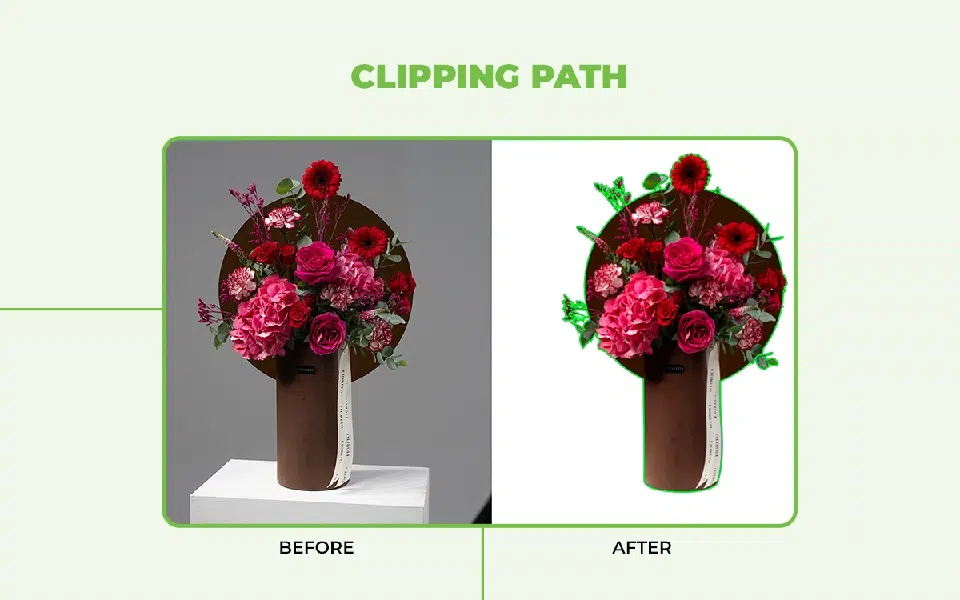
1. Clipping Path
A clipping path is a photo retouching technique to extract a subject so that it can be used for different purposes. Image retouchers use the Photoshop Pen Tool or Path Selection Tool to apply a clipping path. This technique makes the subject usable for any background, such as e-commerce platforms, social media, or company websites.
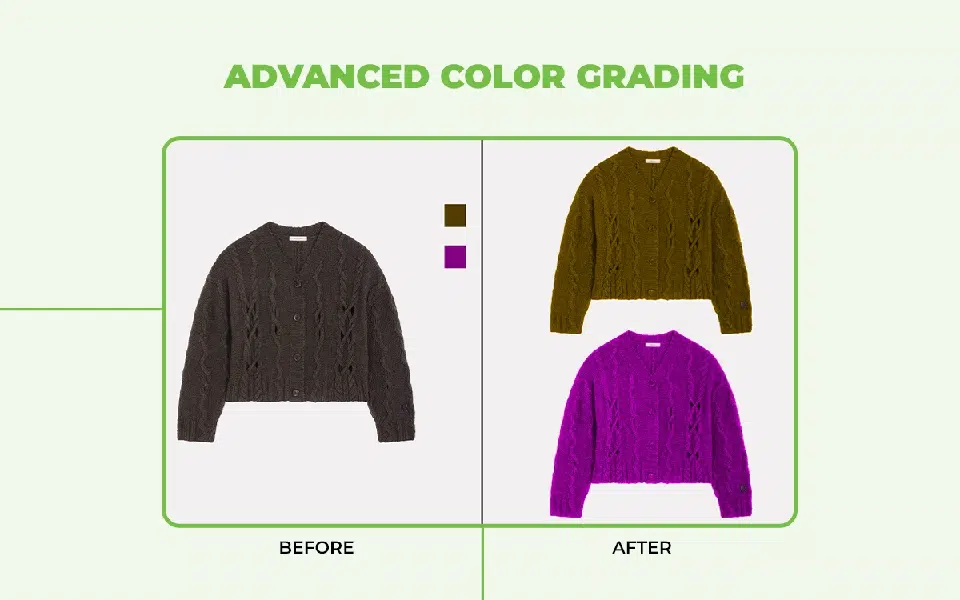
2. Advanced Color Grading
Advanced color grading is a color retouching technique to create a specific mood or style in fashion photos. Tools like Curves, Color Balance, Selective Color, and LUTs in photo editing software are used for color grading images. It creates warm to bold, aesthetic to stylish photos depending on the fashion photo’s purpose.
3. Photo Compilation
Photo compilation is the retouching method to combine multiple images or elements to create one cohesive composition. Photo retouchers use Layer Masks, Blend Modes, and Transform tools for compiling images to create artistic campaign visuals for fashion images.
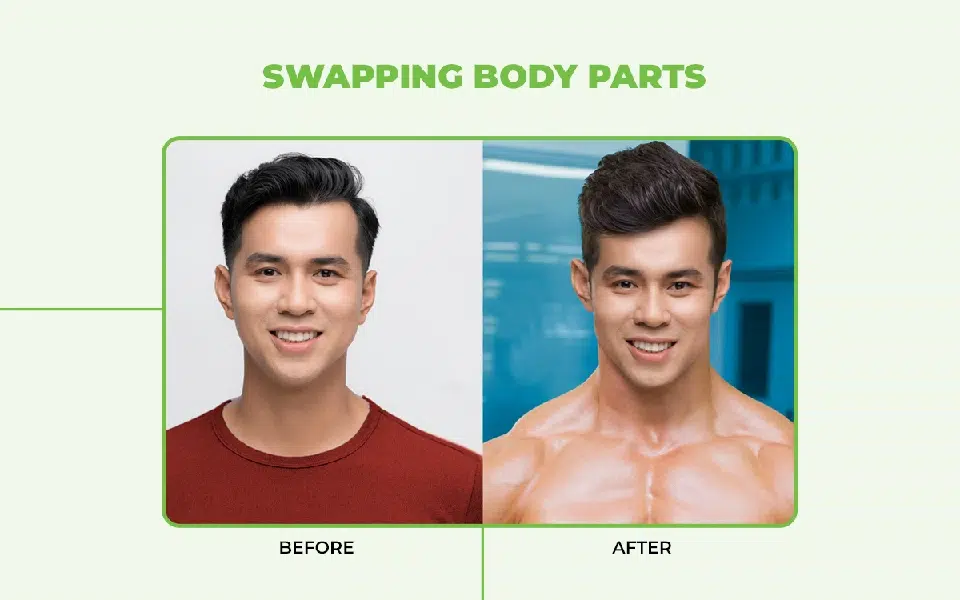
4. Swapping Body Parts
Body parts swapping is created by using the Lasso Tool, Clone Stamp, Healing Brush, and Warp Tool. It creates the right posture and appearance for the right fashion portraits while keeping proportions balanced.
5. Teeth Adjustment
Teeth adjustments are the technique to add a confident and healthy look to a smile. This technique makes images appear friendly, reassures viewers, and increases their buying intent. To retouch teeth, you can use the Dodge Tool, Hue/Saturation, and the Clone Stamp tool.
6. People Placement
People placement is a critical retouching technique where people either remain present, absent, or change position in the photo. The use of the Move Tool, Layer Masks, and Transform options is used for creating this result. Use of these techniques is essential for campaigns or lookbooks where spatial layout is important.
7. Beauty Correction
Beauty correction is the overall appearance improvement technique in model photos. Advanced techniques such as Spot Healing Brush, Frequency Separation, and Dodge & Burn tools are effective tools to apply this technique. Beauty correction produces high-end images with a professional and natural finish for editorial and fashion images.
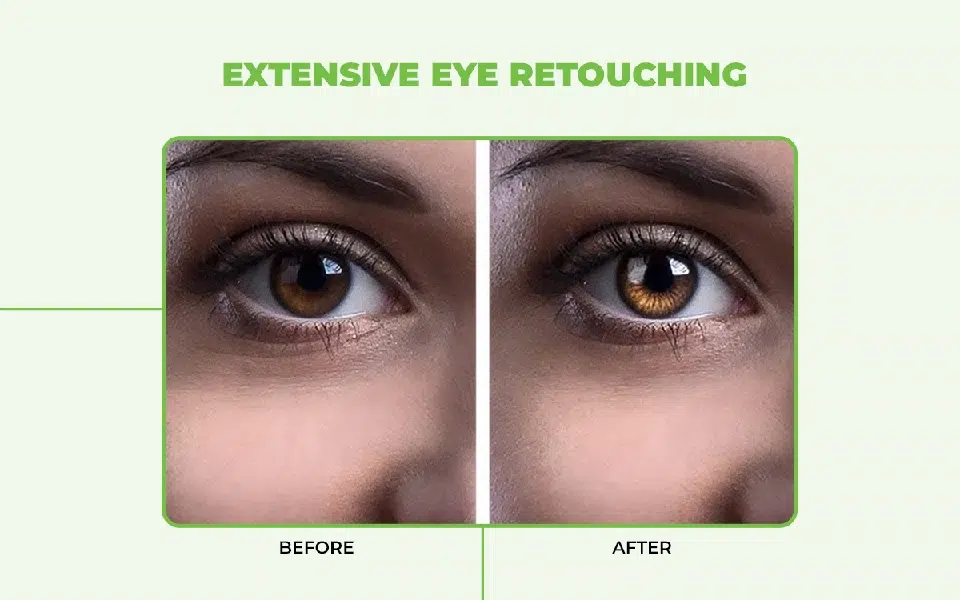
8. Extensive Eye Retouching
Extensive eye retouching is the process of adjusting eyes to appear realistic and attractive. Dodge Tool, Sharpen Tool, and Selective Color help photo retouchers to apply comprehensive retouch to bring life to images and make beautifully edited images.
9. HDR Effects
HDR or high dynamic range effects are the image processing techniques of covering a wide dynamic range, from darkest shadows to brightest highlights, by balancing them. HDR Toning, Exposure Blending, and Camera Raw create an HDR effect to add visual depth, adding details to the subject.
10. Dodge and Burn for Depth and Dimension
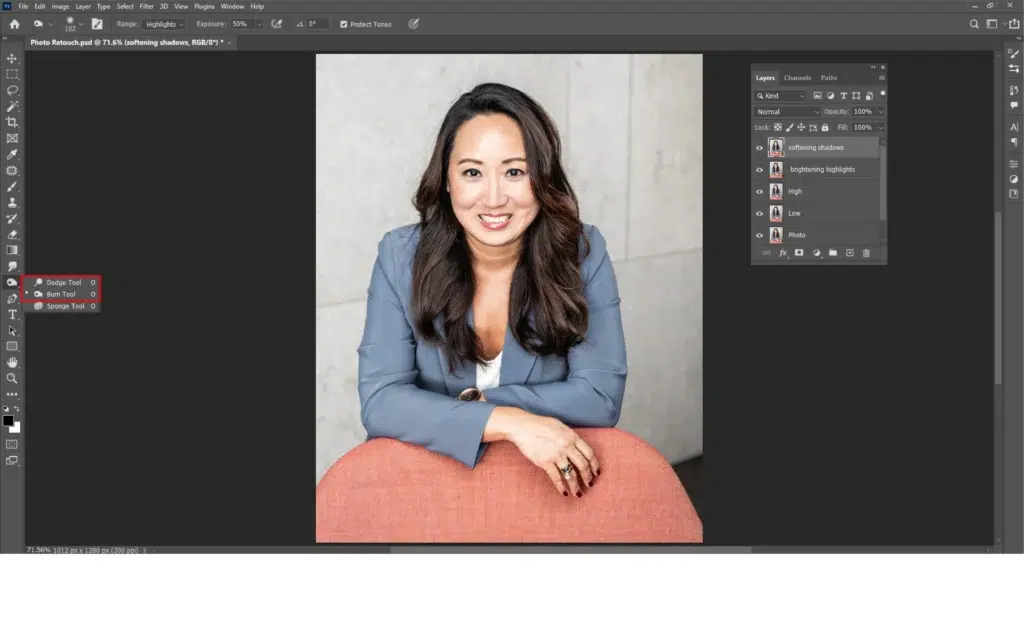
Dodge and burn is the image darkening and brightening option in selective areas in fashion images. There are the Dodge tool, Burn Tool, or 50% gray overlay layers option to apply this technique while retouching. It adds sculpted definition to features, giving a three-dimensional and realistic finish.
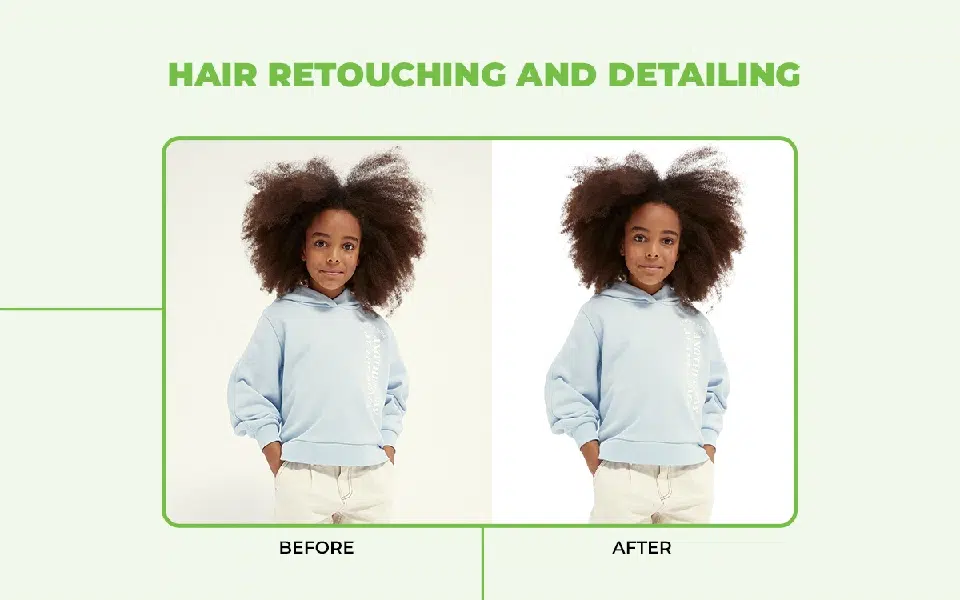
11. Hair Retouching and Detailing
Hair retouching is the process of enhancing hairstyles and look to create a fashionable and professional look through hair adjustments and realistic volume. Retouching tools such as Clone Stamp, Smudge Tool, and Dodge & Burn are the tools for it. Hair detailing and retouching make hair appear neat and natural to convince the audience of fashion products.
12. Advanced Sharpening
Advanced sharpening is the photography post-processing method of creating images with maximum details, minimizing noise and blur, so that the images’ crispness and clarity improve. Using the High Pass Filter, Unsharp Mask, and Smart Sharpen tools sharpens an image. When used, sharpening highlights the subject’s textures, ensuring a polished and premium look.
13. Gradient and Vignette Effects
Gradient and vignetting effects are two separate image retouching techniques; vignetting is the blurring or darkening of the process of photos, and gradient is the transitioning between colors or shades. Both techniques guide viewers’ attention through the smart use of color and light appearance. Lens Correction Filter and Gradient Tools create these effects for bringing cinematic focus or composition improvement in fashion images.
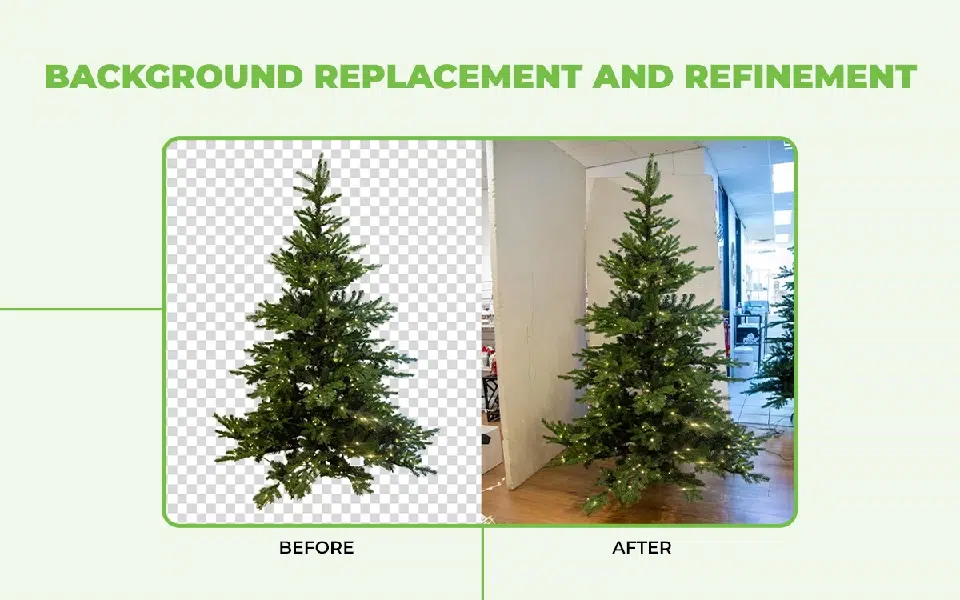
14. Background Replacement and Refinement
Background replacing or refining is the method of placing the subject onto a new background or creating a cutout to fulfill the image’s campaign targets. Photo editors use Select and Mask, Refine Edge, and Blending Modes to change the backgrounds of images. Swapping background makes photos professional, distraction-free, purposeful, and aligns with the brand’s guidelines and commercial objectives.
What is the Fashion Photo Retouching Workflow?
A fashion retouching workflow is the steps every image retoucher follows to streamline the process to create polished, high-quality, and consistent photos for fashion products. There is a 6-step fashion retouching workflow that photo retouchers adjust depending on the product they retouch, as follows.
Step 1: Select and pre-check images
Choose the best images with the least to no flaws. It will save time and editing labor. Fix exposure issues, adjust composition, and crop as needed for platforms.
Step 2: Clean the subject and refine the texture
Smooth the subjects’ outer area (human skin or product material) while preserving texture using frequency separation.
Step 3: Edit adjacent parts and elements
If you are editing model pictures, fix stray hairs, enhance makeup, remove wrinkles, and restore fabric structure. If you are editing products, remove reflection and glare, check the background, and other elements.
Step 4: Create a depth with dodge and burn
Sculpt the subject’s features and details to avoid flat lighting and add a professional dimension.
Step 5: Optimize advanced color grading
Apply color grading techniques to ensure accurate product colors. Follow brand-specific guidelines and themes, and prepare images for print or web.
Step 6: Final output
Apply selective sharpening, and verify image size. If all adjustments are aligned, export the image files in the correct formats and deliver them for online use.
How to Retouch Skin in Photoshop?
Here is the step-by-step guide to retouching skin in Photoshop.
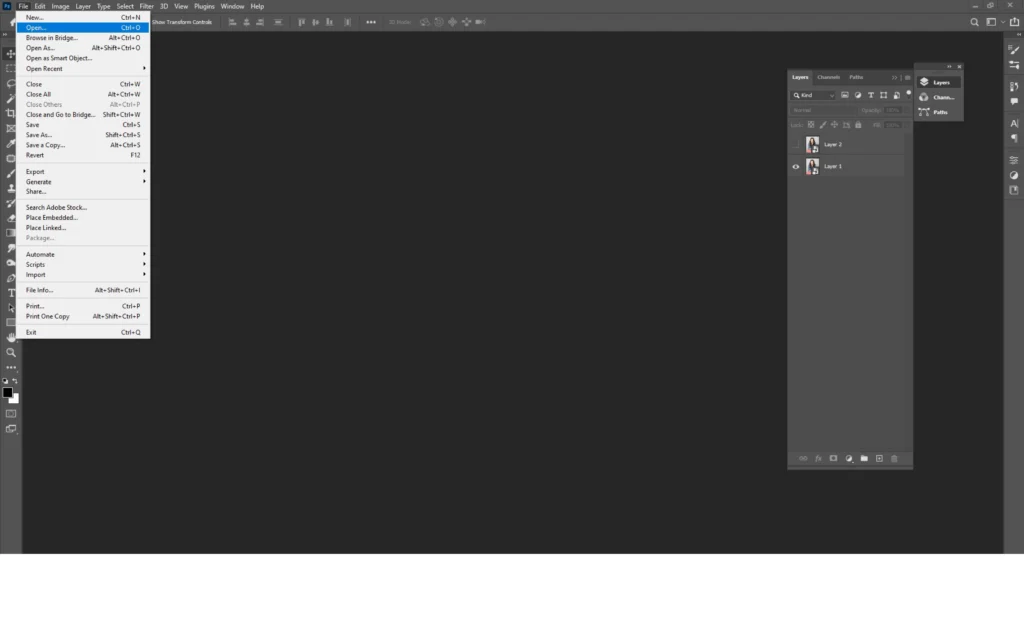
Step 1: Open the Image File in Photoshop
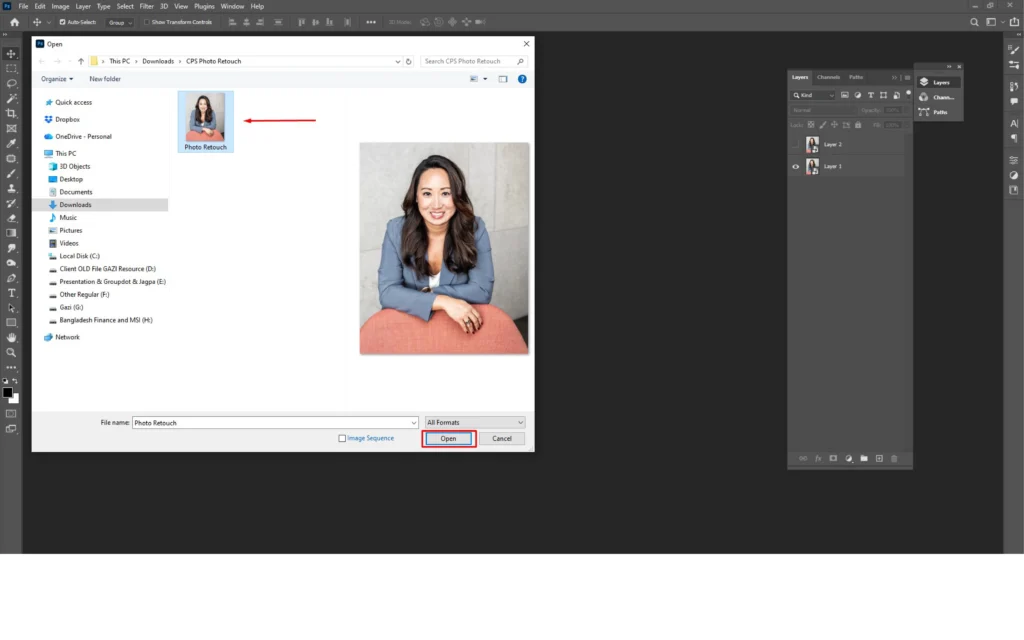
Go to ‘File’ and click ‘Open’.
Choose high-resolution images, because better image quality will allow you more control during retouching.
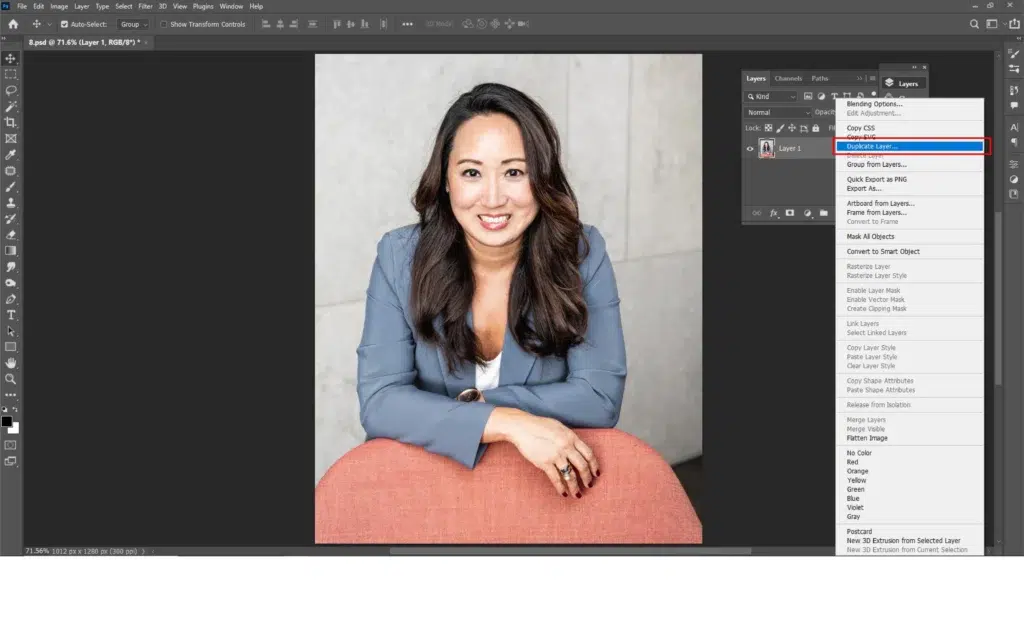
Step 2: Duplicate the layer
Click right on the background layer and select ‘Duplicate Layer’. By creating a duplicate layer, you can experiment and work comfortably without harming the original image.
Step 3: Clean up the Flaws
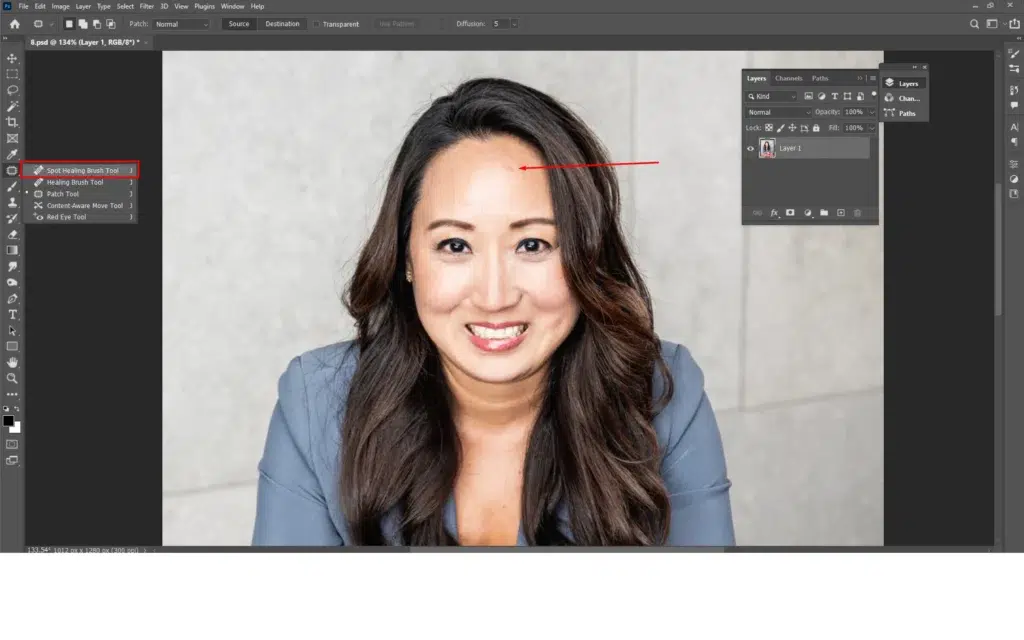
Start by removing minor imperfections. Select the ‘Spot Healing Brush Tool’ from the toolbar and zoom into the face. Remove temporary marks such as pimples or acne. It will make the skin look fresh. Refrain from removing natural features, such as moles or any specific client mentions, so that the face personifies the personality.
Step 4: Smooth the Skin with Frequency Separation
Create two extra copies of the working layer. Let’s name it low and high, low for applying soft tones and high for applying high textures.
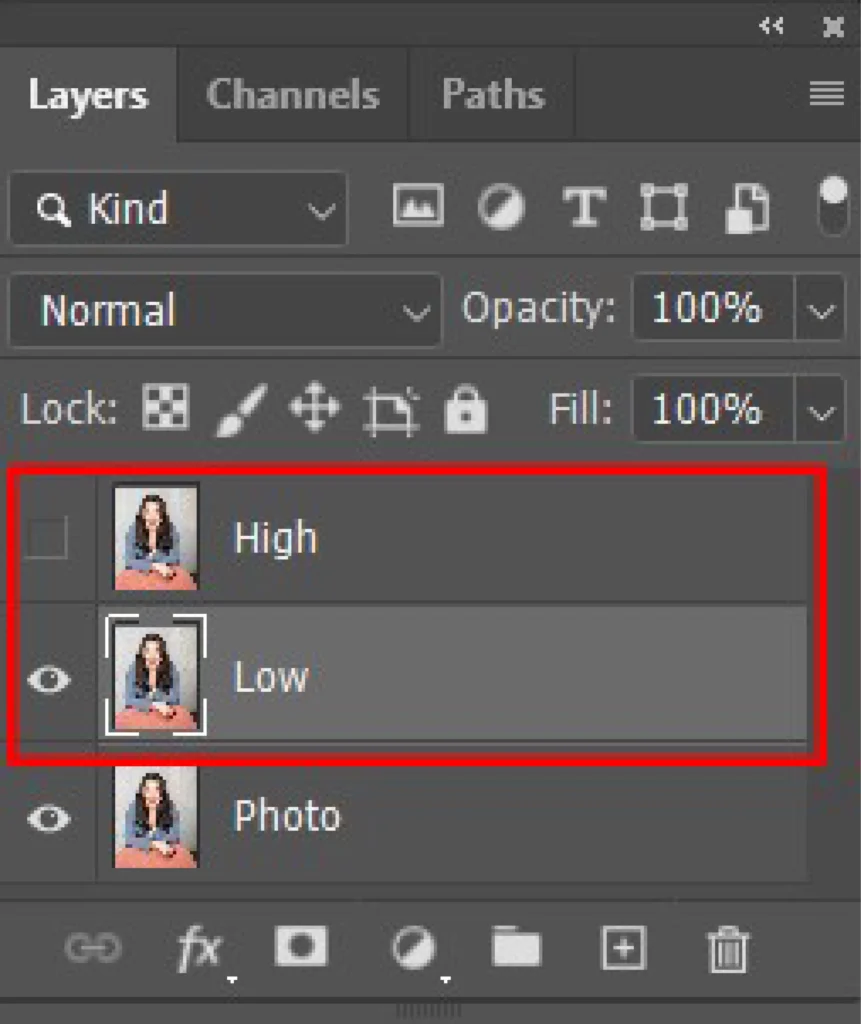
Blur the low layer with ‘Gaussian Blur’ to smooth skin tones.
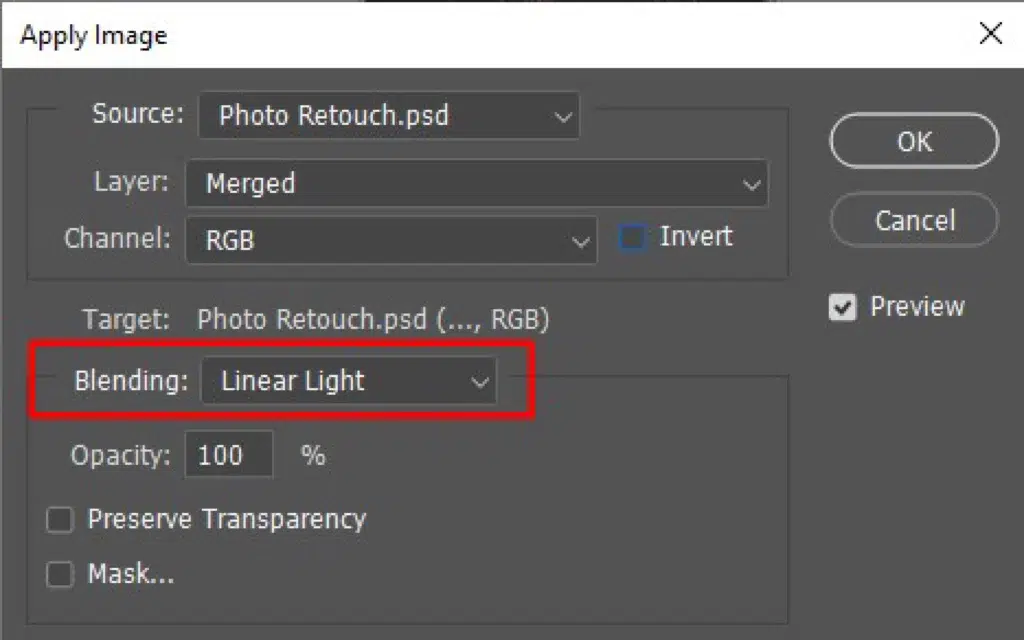
Then, use ‘Apply Image’ and set it to Linear Light to apply texture restoration on the High layer.
Now, paint softly on the low layer; it will reduce the patchiness, and the pores will stay visible for a natural appearance.
Step 5: Restore Shape with Dodge & Burn
Add 2 more layers for brightening highlights and softening shadows. Use a soft brush at low flow. This step will define cheekbones and reduce flatness.
Step 6: Rectify Uneven Color Tones
Use the “Hue/Saturation adjustment” layer and work on the Reds or Yellows based on the skin tone.
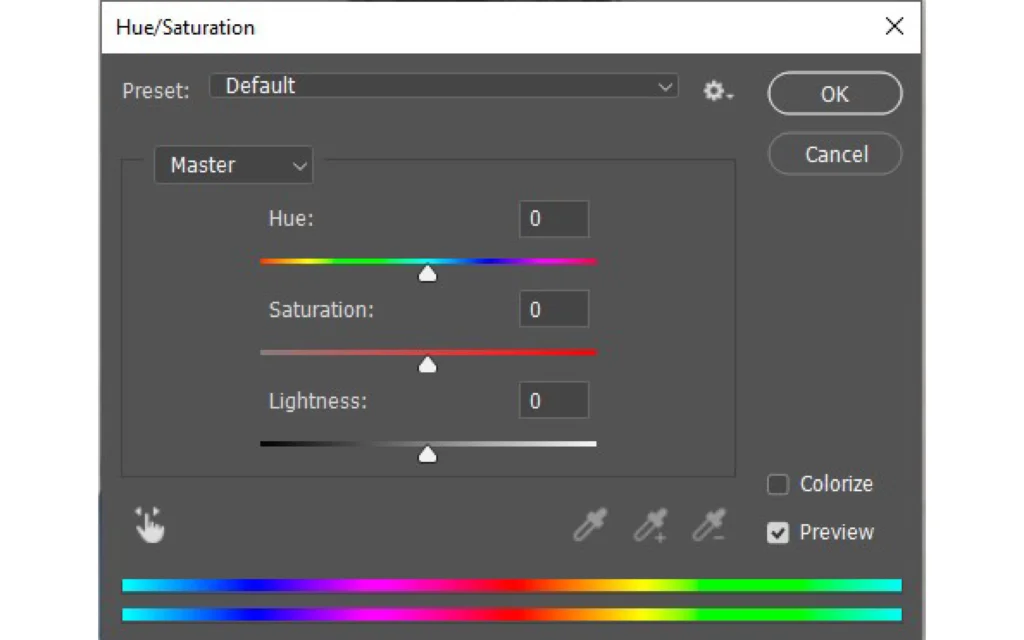
Minimize blotchy areas slightly to create healthy and consistent skin tones.
Step 7: Sharpen the Details
Sharpened the essential features to guide viewers’ attention, such as eyes, brows, cheeks, lips, hair, etc. Once complete, export it in your preferred file format.
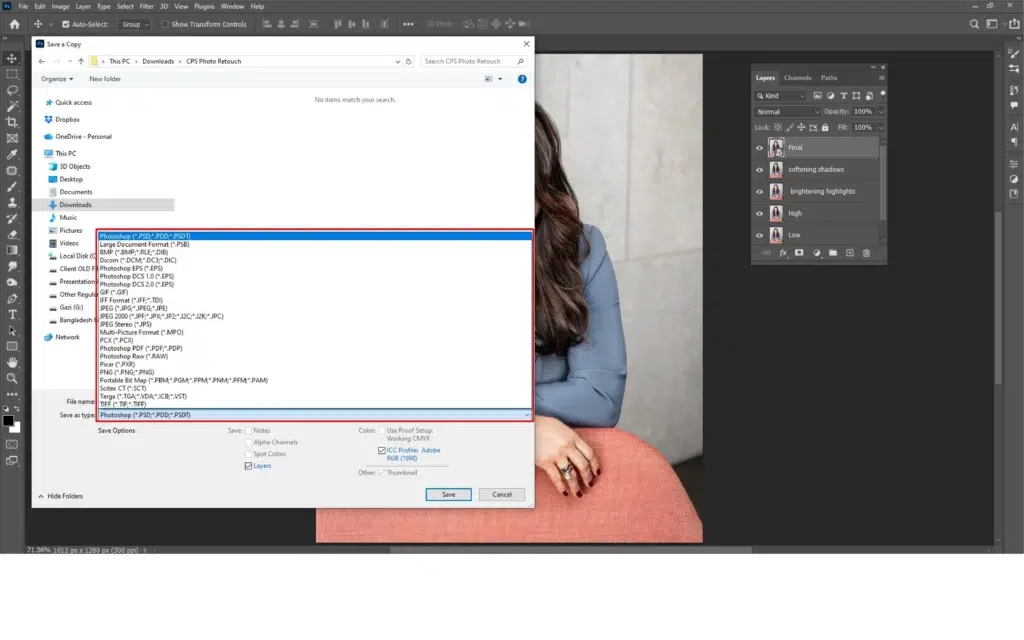
How Do Professionals Use Photoshop Layers and Masks for Fashion Photo Retouch?
There are 3 main ways professionals use Photoshop layers and masks for fashion retouching, given that it allows complete control over photo processing while keeping the original images intact, which are as follows.
Way 1: Applying Separate Retouching on an Individual Layer
You can use one layer for one specific adjustment, for example, one layer for skin retouching, and another for color correction. It will make the entire workflow flexible as you can work with specific elements, opacity, or delete a single change anytime.
Way 2: Using Adjustment Layers for Non-destructive Editing
Using adjustment layers for brightness, contrast, and color makes the retouching process smooth. Those adjustments sit above the image like transparent filters, changing the image’s appearance without harming the pixels. You get the skin texture and details crisp with editable images.
Way 3: Using Layer Masking for Selective Retouching
Use masks for applying effects for selective retouch. The different colors of masking will show which part hides or shows. White reveals edit, black hides it completely, and gray applies partial editing. You can fully control and retouch important details.
Why Should You Use Hand-Drawn Fashion Photo Retouching Instead of AI?
You should use hand-drawn fashion photo retouching instead of AI because it provides situation-based and precise control over details, and preserves natural texture to maintain the original appearance. Human retouching makes each step rational to produce high-end, realistic results that AI often cannot replicate in fashion portraits. That’s why retouchers use photo retouching apps to ensure quality images.
Other reasons to avoid relying solely on AI are as follows.
- AI may create oversmoothing skin, making it look cartoon.
- Working on textures, lighting, and shadows may appear unrealistic.
- It can misinterpret brand-specific color standards.
- AI cannot make judgmental decisions and struggles with complex and intricate shapes.
- AI lacks the creativity and subject-specific details that professional retouchers provide.
Can Fashion Photo Retouching Techniques Be Used in E-commerce?
Yes, fashion retouching techniques such as skin smoothing, color correction, and background refinement can be used in e-commerce photo retouching to create commercial-standard photos. These techniques enhance product and model appearance, ensure accurate presentation through colors, and create clean, distraction-free backgrounds. It makes e-commerce images more professional, polished, and conversion-friendly for online shoppers.
How Much Does Professional Fashion Photo Retouching Cost?
Professional fashion retouching cost starts at $0.60 per image. It varies based on retouching type, product/model images, project volume, turnaround, and number of revisions.
- Retouching type: Retouching type varies by basic ($0.60), professional ($1.99), high-end ($3.99), and custom (based on project).
- Product/model images: Product complexity, details, texture, materials, etc. Model face, skin, hair, etc.
- Project volume: Number of images, level of editing techniques images need to create high-quality images.
- Turnaround times: Faster turnaround increases the regular cost of retouching an image.
- Number of revisions: The number of revisions also contributes to increasing the cost.
FAQ’s
How does fashion retouching differ from basic photo editing?
Fashion retouching differs from basic photo retouching in terms of adjustments. Basic photo retouching encompasses work that adjusts existing elements in the photo, such as size, color, brightness, etc. Fashion retouching involves deep-level editing, such as enhancing product features, models’ faces and skin, color grading, clothing detailing, etc.
Why is color correction crucial in fashion retouching?
Color correction is crucial in fashion retouching because it ensures the subject looks true-to-life across different screens, boosts buyers’ confidence to buy, and emphasizes the brand’s marketing purposes towards more conversions. Color correction makes products appear authentic, which is essential for luxury brands or e-commerce fashion products where consistent output matters.
Can AI tools replace manual fashion retouching?
AI tools cannot replace manual fashion retouching; rather, they aid the image processing steps. It is a fast and cost-effective editing that expert photo retouchers consciously use for bulk image editing. But AI cannot detect image complexity, human features, fabric nuances, etc, where manually editing is necessary for control and precise results.
What should clients look for when hiring a fashion retouching service?
When hiring a fashion retouching service, clients should look for the service providers’ portfolio, expertise and categories of services, pricing structure, customized solutions, revisions, and turnaround times.