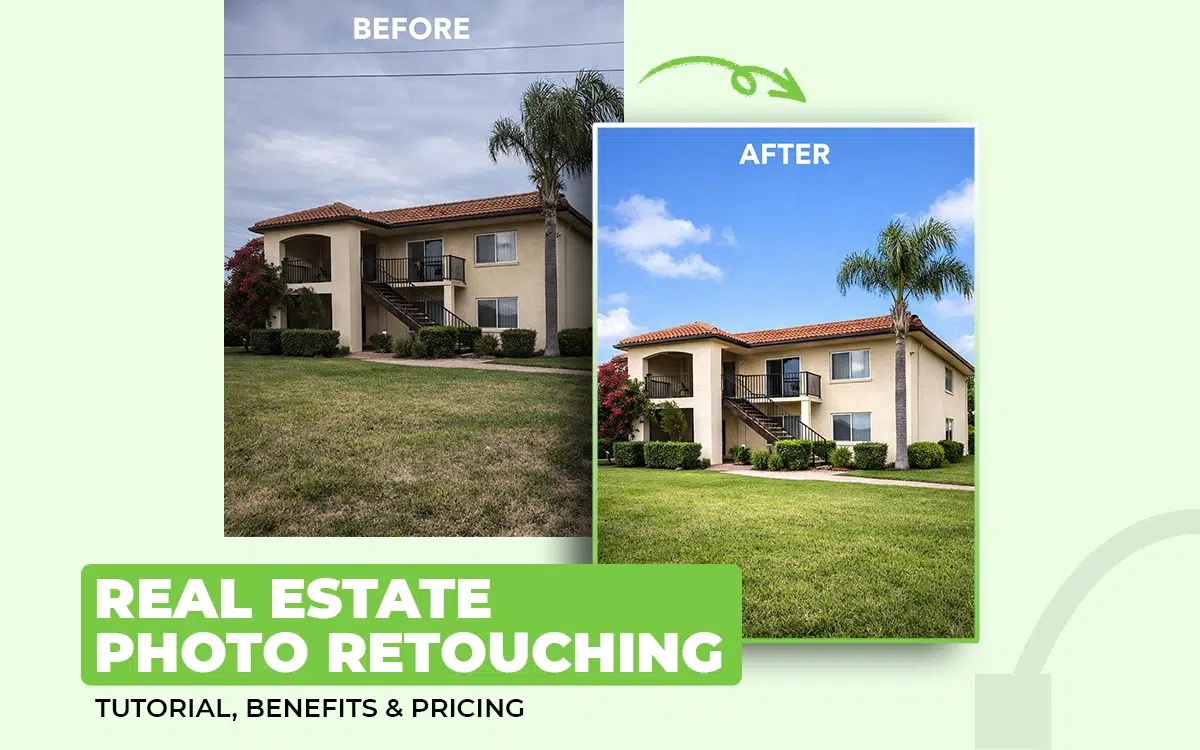
Real estate photo retouching refers to the retouching work applied to property images, interior and exterior photos, home and office locations, inside and landscape views, etc. The type of retouching such images require includes photo cleaning, object removal, color correction, HDR, photo collage, 360-degree image creation, etc.
Property image retouching has an impact on how buyers interact and decide to purchase. The cost of retouching in the US starts around $0.70. Renowned photo retouching companies include Clipping Path Studio, PhotoUp, Phixer, among others.
What you’ll learn in this article
- 1 What is Real Estate Photo Retouching?
- 2 Why Do Real Estate Agents Use Professional Photo Retouching Services?
- 3 How Do You Retouch a Real Estate Photo?
- 3.1 Step 1: Upload the Images to Your Photo Editing Software
- 3.2 Step 2: Create a Non-destructive Editing
- 3.3 Step 3: Adjust the Image to Correct Perspective
- 3.4 Step 4: Remove Distraction and Flaws that Hinders the Viewer’s Focus
- 3.5 Step 5: Work on Colors, Tones, and Lighting
- 3.6 Step 6: Export the Retouched Images
- 4 What are the Best Real Estate Photo Retouching Services in the USA?
- 5 How to Find the Best Real Estate Photo Retouching Company in the United States?
- 6 What is the Real Estate Photo Retouching Service Cost?
- 7 FAQ’s
What is Real Estate Photo Retouching?
Real estate photo retouching is the photo editing segment to enhance real estate images, property images, office and home space images to make them visually polished and conversion-focused. It includes cleaning up spaces, correcting lighting, balancing colors, removing imperfections, and refining details to highlight a property’s best features to convince potential buyers. Real estate retouch ensures that interior and exterior shots look bright, spacious, and inviting, presenting the property in its most attractive form.
Professional photo retouchers use software like Adobe Photoshop, Adobe Lightroom-like tools to achieve a realistic visual representation. Such images help both buyers and sellers by providing the following benefits.
- High-quality, visually appealing images immediately capture attention and increase interest in listings among renters and buyers.
- Retouching works highlight architectural features, spaciousness, and natural light, making the property the best choice.
- Professionally retouched images have the removal of unwanted objects, reflections, or minor flaws to retain viewers’ focus.
- Listings with enhanced visuals tend to generate more inquiries and quicker sales or rentals.
What is the Difference Between Real Estate Photo Retouching and Editing?
The key difference between real estate photo retouching and editing is the level of editing they cover. Retouching covers a specialized task of detailing and enhancing the property to make it conversion-worthy, whereas editing covers all types of changes, adding and removing that happen inside the image.
Other differences between real estate editing and real estate retouching are as follows.
| Topic | Real Estate Photo Retouching | Real Estate Photo Editing |
|---|---|---|
| Editing covers | All types of editing, changes, adding, and removing | Only focuses on enhancing the image’s look |
| Detail Enhancement | Flexible depending on images | Enhances textures, architectural features, and room depth |
| Adjustments | Exposure, white balance, cropping, basic color fixes | Brightness, color grading, highlights/shadows |
| Objective | Corrects technical flaws in images | Enhances aesthetics and makes images market-ready |
| Impact | Makes photos accurate and clean | Makes photos stunning to attract buyers |
Why Do Real Estate Agents Use Professional Photo Retouching Services?
Real estate agents use professional photo retouching services because they enhance the property’s look, remove flaws, and make it spacious. Such photos directly impact realtors’ sales velocity, brand credibility, and listing performance. According to a 2025 blog by World Metrics titled Real Estate Photography Statistics has been stated that “70% of buyers form an opinion about a property within the first 60 seconds of viewing photos.” As a result, retouching property photos has become a strategic business decision that drives measurable results.
Other reasons why realtors hire professional photo retouching services are as follows.
1. Retouched Photos Increase Engagement and Lead Quality
Professionally retouched photos make property appear brighter, wider-looking, and emotionally inviting, stopping buyers from scrolling. Higher-quality images generate more listing clicks and better-qualified leads, which saves them from chasing uninterested buyers.
2. Edited photos display the Property at a Higher Value
Agents use retouching to showcase a property’s benefits, space, natural light, layout flow, and curb appeal, to make the listing appear premium. Such photos can justify a stronger asking price and reduce buyer negotiation pressure.
3. It Strengthens the Agent’s Personal Brand
Agents compete in crowded markets. Sharp, polished positions the agent as someone who invests in quality marketing, building buyers’ trust in his profession and work. This elevates brand reputation and helps secure future listings from sellers who want premium space representation.
4. It Supports Consistent Branding Across Multiple Listings
Editing ensures a cohesive visual style, consistent brightness, colors, tone, and composition in property images. It makes their portfolio look unified and high-end. This consistency is critical for agencies targeting luxury or competitive urban markets.
5. It Helps Agents Reduce Staging Costs and Time
Retouching improves the visual of the property. Virtual enhancements, such as sky replacement, clutter removal, window masking, and lawn repair, allow agents to present a polished property without paying for expensive physical staging or waiting for perfect weather. This saves time and cuts marketing costs significantly.
How Do You Retouch a Real Estate Photo?
Here is the step-by-step guide in Photoshop for retouching a real estate photo.
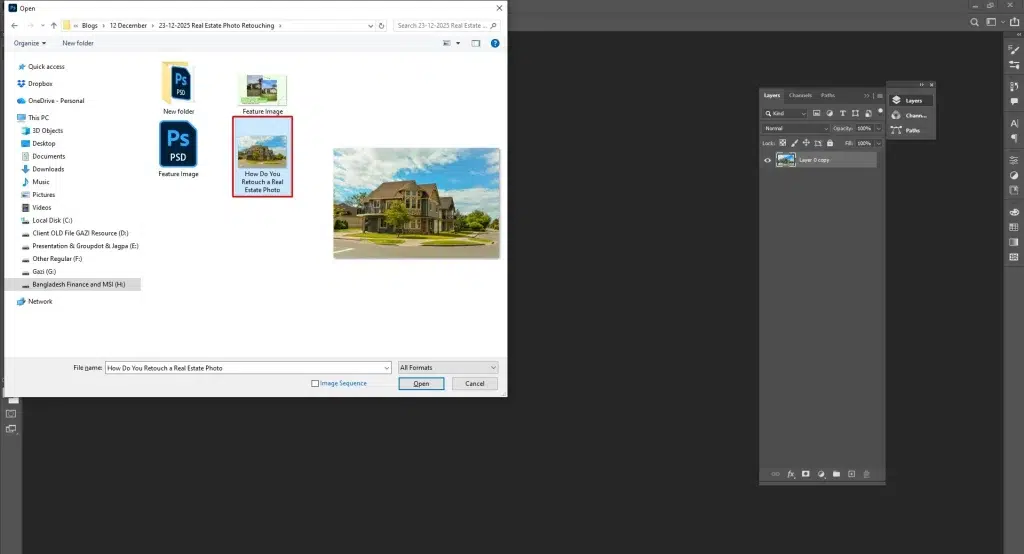
Step 1: Upload the Images to Your Photo Editing Software
- First, open Photoshop.
- Then go to File.
- Click Open and then select your RAW/JPEG files.
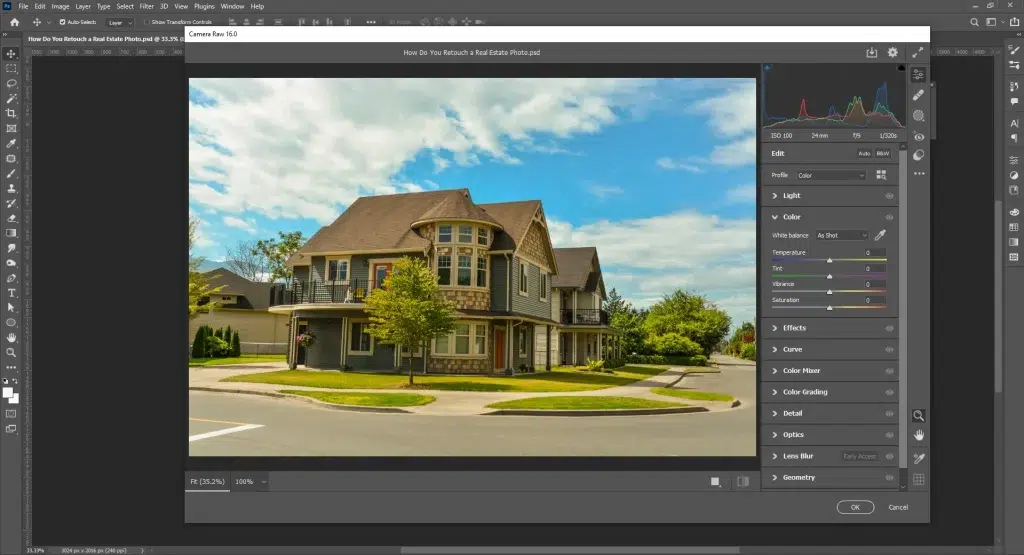
Raw files will first open in Camera Raw. Here you can work on exposure, white balance, colors, tones, etc.
Step 2: Create a Non-destructive Editing
Go to Layer and Duplicate Layer (or press Ctrl+J / Cmd+J) to create a copy to retouch a photo. Now you are safe to work and can work on it non-destructively, with a backup.
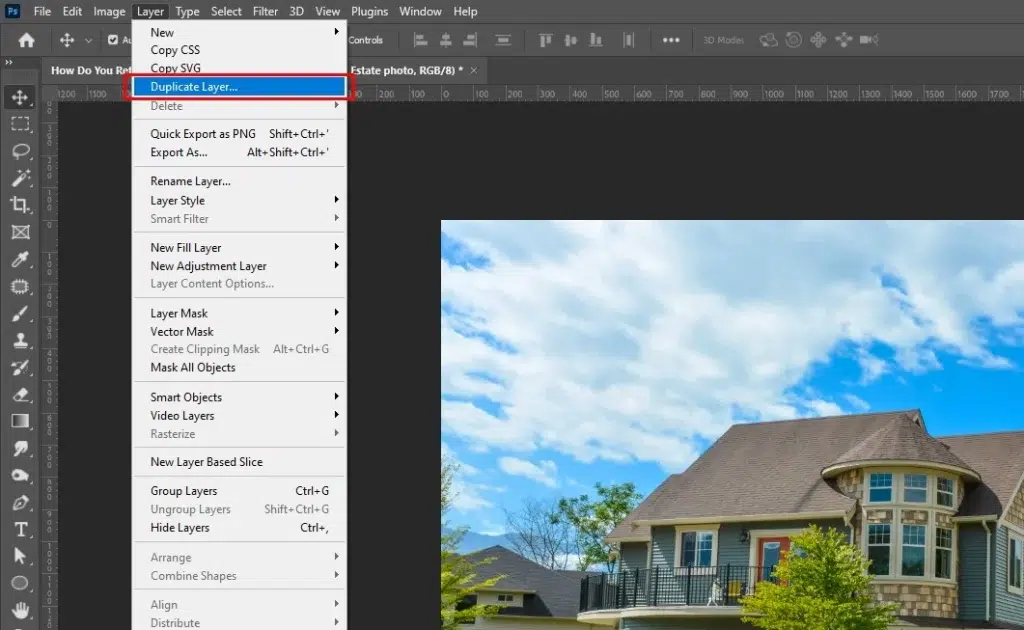
To keep the editing process reversible.
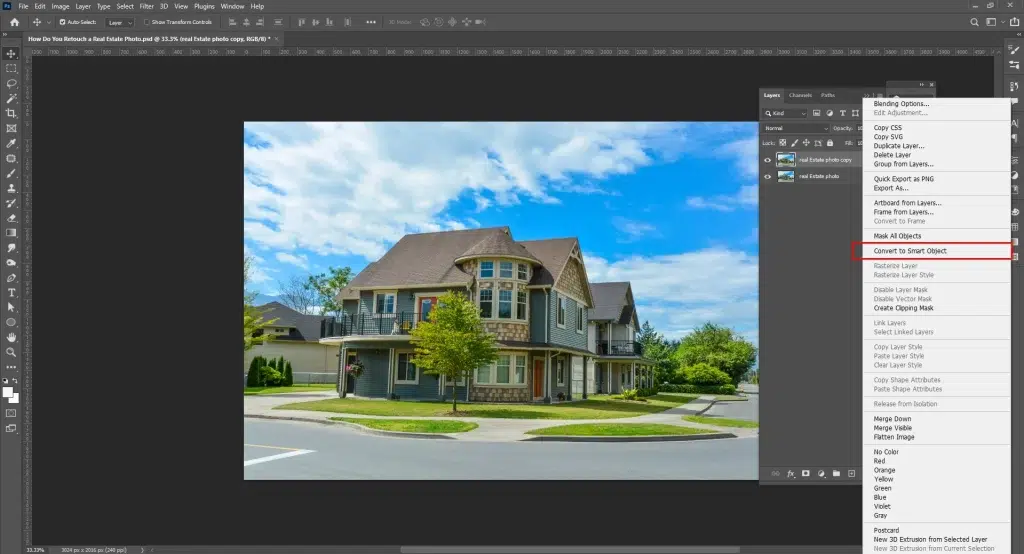
- Go to Layer, and then Adjustment Layer.
- Right-click the layer and select Convert to Smart Object to convert your layer.
Step 3: Adjust the Image to Correct Perspective
Crop or stratify your property images to make it appear natural to the human eye. Select Crop Tool (C) and drag edges, then press Enter.
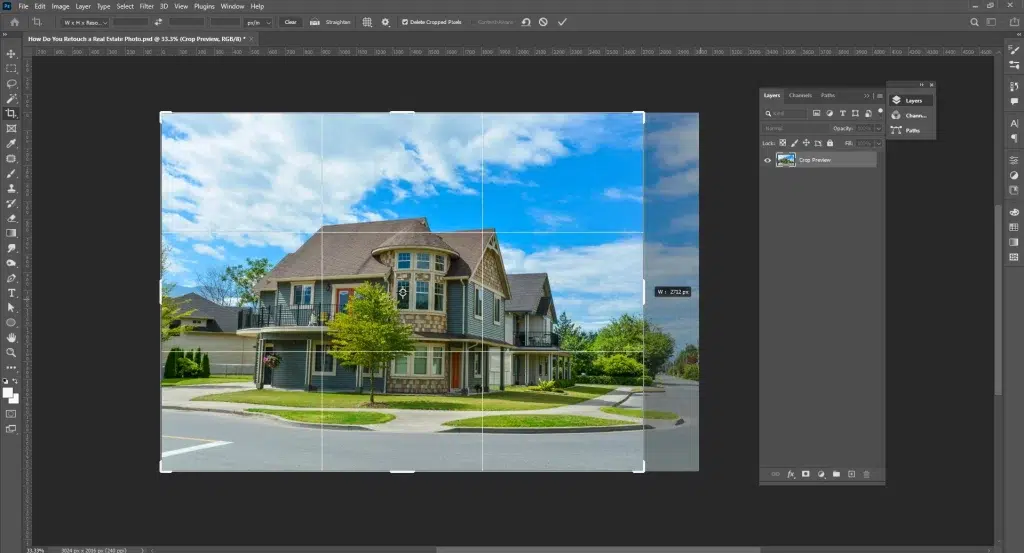
Use the Straighten tool in the Crop toolbar to fix tilted horizons or leaning walls. Once done, follow these steps to Perspective correction for the interior/exterior lines.
- Go to Edit → Transform → Perspective or Warp.
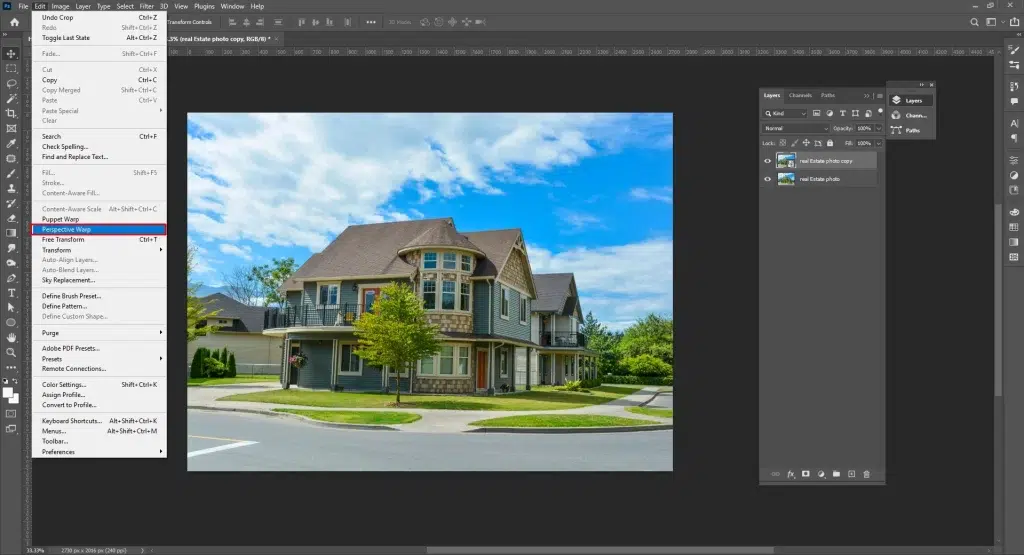
- Drag corner handles until walls, door frames, and window lines look vertically aligned.
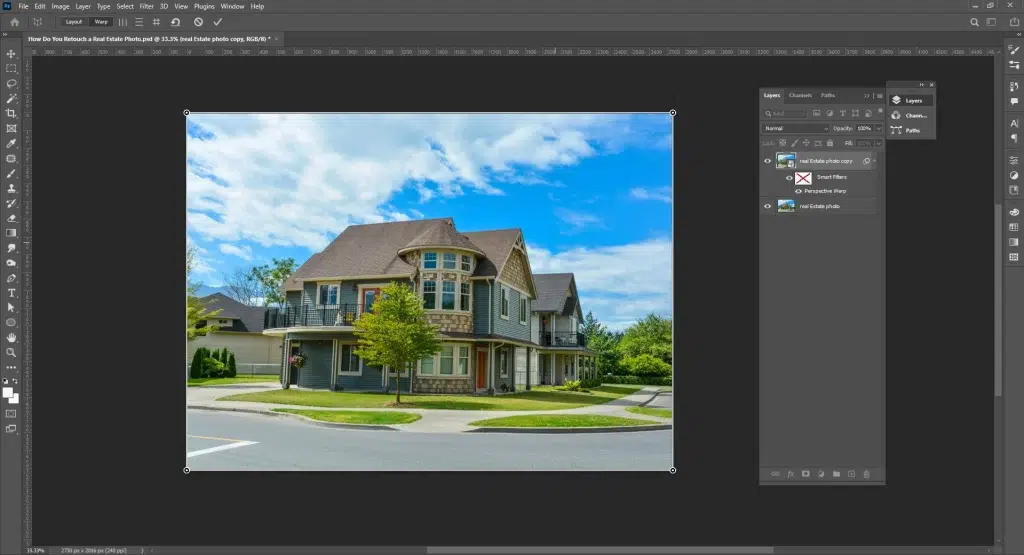
- Press Enter to apply.
Step 4: Remove Distraction and Flaws that Hinders the Viewer’s Focus
Edit the flaws out for a clean appearance of real estate photos. For that, use Spot Healing, Healing Brush, and Content-Aware Fill from the Tools Panel in Photoshop. Alternatively, go to Edit → Content-Aware Fill.
If you need to quickly fix something, such as light switches, window dust, wall marks, or floor blemishes, use the Spot Healing Brush Tool.
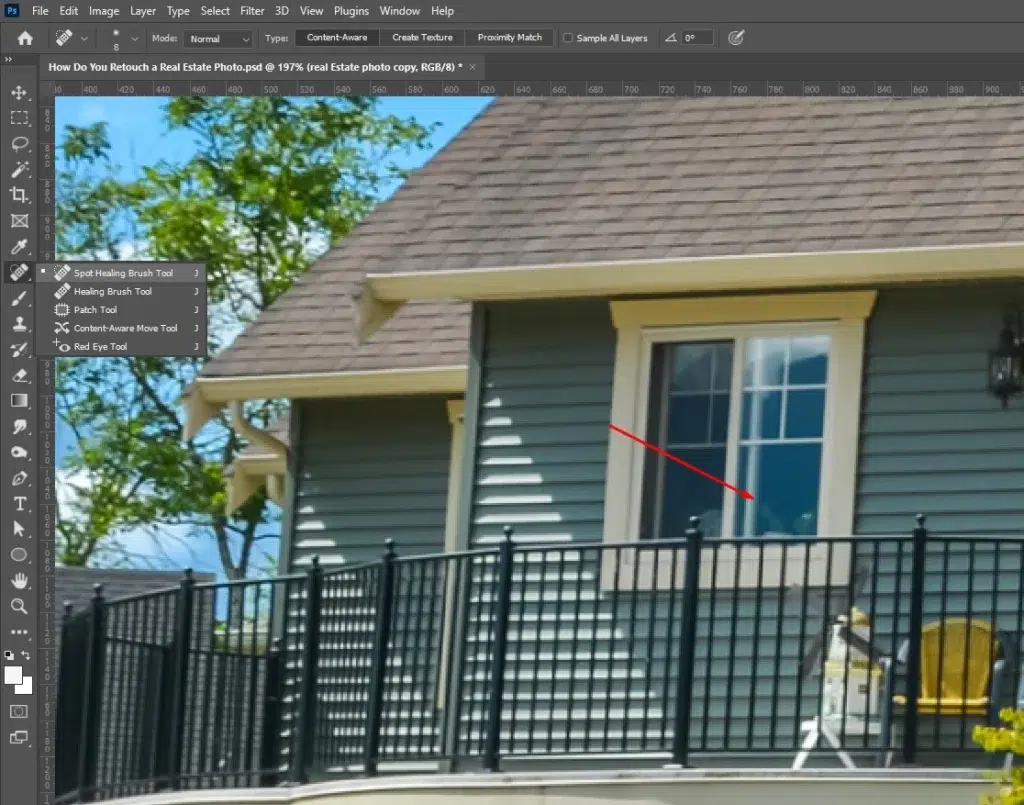
- Select the Spot Healing Brush (J) → set Type: Content-Aware in the top bar → click over small flaws to auto-remove them.
If you need in-depth and precise cleaning, for example, adjusting textures, cracks, etc, follow these steps.
- Choose the Healing Brush (J, long-press).
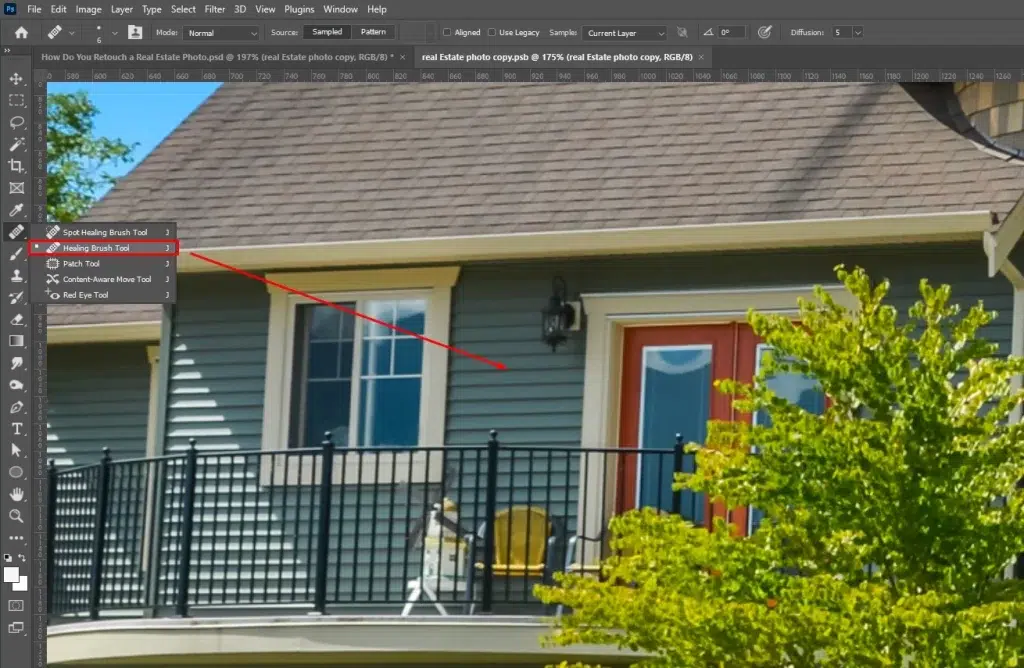
- Click Alt/Option + Click to sample a clean area.
- Brush over the distraction to blend it naturally.
For removing furniture, people, or signage-like objects from an image, follow these steps.
- Use the Lasso Tool (L) to select the object.
- Go to Edit and click Content-Aware Fill.
- Then adjust the sampling area if needed.
- Click OK to cleanly erase the object.
Step 5: Work on Colors, Tones, and Lighting
Enhance colors and lighting to make a better view of the spaces, for that use Adjustment Layers (Layer → New Adjustment Layer) for reversible, pro-grade edits. Use the following tools to make an interior look clean and realistic.
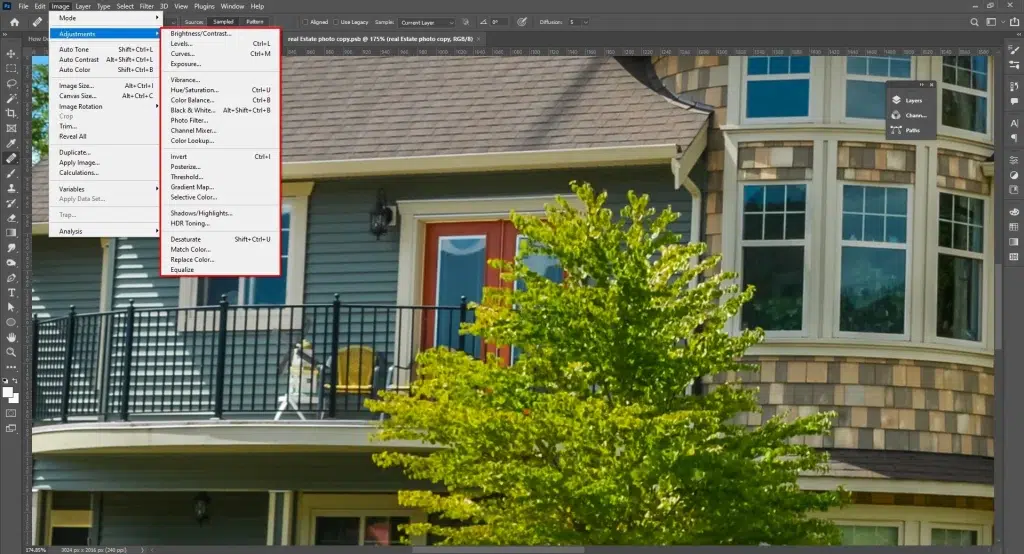
- Color Balance: Neutralize color casts from indoor lights (reduce yellow/orange for tungsten-lit rooms).
- Curves: Add contrast and brighten interiors without blowing highlights.
- Vibrance: Boost color gently to keep rooms natural but lively.
- Selective Color: Adjust whites, blacks, and neutral tones to get clean walls and balanced shadows.
Save your edits as a Camera Raw preset or apply a LUT so every room maintains consistent brightness, white balance, and color tone across the whole listing.
Step 6: Export the Retouched Images
Once the retouching is complete and the photo has gained the expected appearance, save the file.
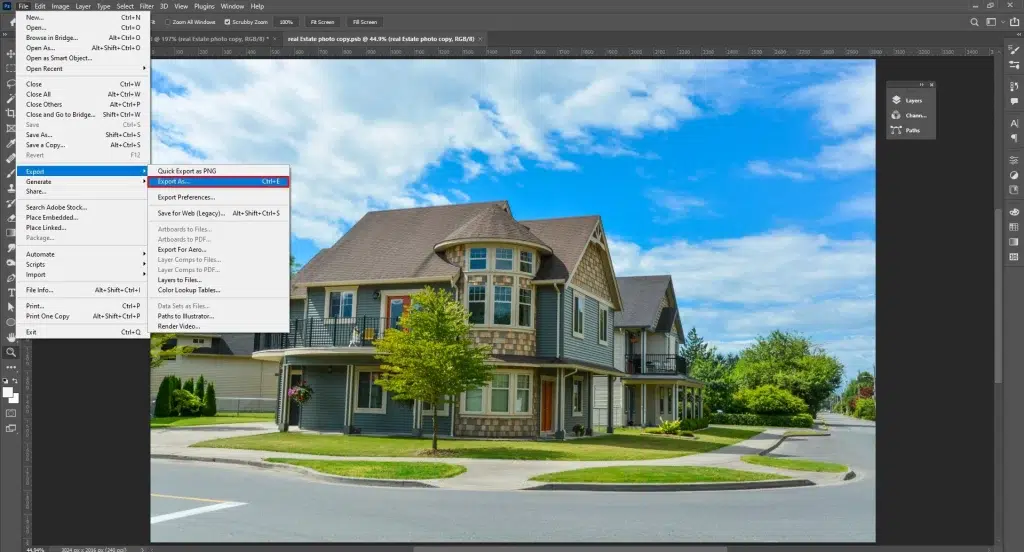
- Go to File → Export → Export As.
Choose the format based on your needs, for example, JPEG for web listings, PNG for images that require transparent backgrounds, and TIFF for high-quality print output. While saving your files, use sRGB color space for web display, 80–90% quality for JPEG files, and 300 DPI resolution for anything intended for print for the best output.
What are the Best Real Estate Photo Retouching Services in the USA?
The best real estate photo retouching services in the USA are Clipping Path Studio, PhotoUp, Phixer, and Offshore Clipping, decided based on turnaround, service category, and quality, cost, and rating from the users as follows.
| Service Provider | Turnaround | Free Trial | Cost (per image) | Rating |
|---|---|---|---|---|
| 1. Clipping Path Studio | 12–24 hours | 5 images | $0.70–$3.99 | 4.3 (TrustPilot) |
| 2. PhotoUp | 12–24 hours | 10 free edits/credits | $1.00–$1.5 | 4.9 (Google Review) |
| 3. Phixer | 12–24 hours | Yes | $2+ | 4.7 (Google Review) |
| 4. FixThePhoto | 48 hours | 3 images | Pricing is unclear | 2.2 (Trustpilot) |
| 5. Offshore Clipping | 12–24 hours | 5 images | $0.60 | 4.9 (TrustPilot) 4.2 (Google Review) |
| 6. BoxBrownie | 24 hours | 4 free edits | $1.60–$2+ | 4.9 (Google Review) |
| 7. PhotozWorld | 12–24 hours | Yes | Quote-based | |
| 8. ProGlobalBusiness Solutions | 12–24 hours | Yes | $0.30–$0.90+ | |
| 9. Smart Photo Editors | 12–24 hours | Yes | $0.50–$0.80 | |
| 10. BeatColor | 12 – 24 hours | Not clear | $0.70 |
1. Clipping Path Studio
Clipping Path Studio is a high-end photo retouching service that offers business-specific, fast, and affordable image enhancement solutions. Backed by a team of 200+ Photoshop experts and industry knowledge over 10 years, the company offers real estate enhancements, object removal, exposure balance, and color correction with fast 24‑hour delivery and flexible revision support.
Other Service Categories: Video editing, clipping path service, e-commerce photo retouching, background removal, color correction, shadow creation, masking, etc.
Pros & Cons
| Pros | Cons |
| US-based services | Services are not available in Asian countries |
| Budget-friendly and business-specific pricing | |
| Quick turnaround | |
| Consistent quality for high‑volume projects | |
| Hand-drawn retouching for precision |
Pricing: Starts around $0.70.
Best for: Clipping Path Studio is best for agents needing high-volume listings where clean, professional images are mandatory.
2. PhotoUp
PhotoUp is a top-level retouching service that is dedicated to real estate. A team of retouchers ensures quality work through professional retouching, object removal, HDR blending, sky replacement, and marketing assets like property websites and floor plans.
Other Service Categories: Video editing, virtual staging, property websites, and virtual tours.
Pros & Cons
| Pros | Cons |
| US‑oriented support | Slightly higher per‑image costs |
| Free revisions | Account setup and onboarding may take longer |
| Intuitive platform | |
| Offers consistent output |
Pricing: About $1.00–$1.50.
Best for: Hire PhotoUp when you want full-service editing with web assets.
3. Phixer
Phixer is a professional visual enhancement company for real estate. It offers both photo and video editing solutions, both traditional and custom levels. With a decade of long industry experience, real-estate agents get all types of retouching solutions such as HDR blending, exposure and color correction, object removal, sky/lawn replacement, virtual twilight, and virtual staging.
Other Service Categories: Photo editing, video editing, virtual staging, lawn replacement, virtual twilight, declutter, AI editing, and AI website builder.
Pros & Cons
| Pros | Cons |
| Phixer mobile app for quick editing | Pricing isn’t directly mentioned |
| Fast turnaround options | Clients reported quality inconsistency |
| High-Quality Edits | |
| Helpful customer service |
Pricing: $2+
Best for: Choose Phixer when speed and volume capability are your priority.
4. FixThePhoto
FixThePhoto is a renowned and long‑established online retouching service offering property and real estate retouching solutions. Their retouching team members take care of your images with HDR blending, object removal, color correction, and brightness fixes so that your images stand out and convince during buying, selling, or renting buildings.
Other Service Categories: Day to dusk, item removal, sky replacement, lawn retouch, dust and garbage, TV image replacement, HDR bracketing with indoor replacement, brightness and contrast, lens distortion, among others.
Pros and Cons
| Pros | Cons |
| Decades of experience and varied enhancement options | Customers raised concerns about the website price vs the invoice prices |
| Broad editing capabilities | Unresponsiveness is reported |
| Standard turnaround times | |
| Broad editing capabilities |
Pricing: Not clearly mentioned.
Best for: FixThePhoto is your solution when you need a specific type of retouch to apply beyond basic.
5. Offshore Clipping
Offshore Clipping is a specialized real estate photo retouching service provider that delivers MLS-ready, high-quality property images. Assisting professional agents, brokers, and photographers, their real-estate retouching covers exposure correction, HDR blending, sky replacement, window masking, clutter removal, and perspective correction to present real estate in the best light to drive conversion.
Other Service Categories: Photo editing, color correction, background adjustment, shadow creation, clutter removal, HDR blending, etc.
Pros & Cons
| Pros | Cons |
| Real-estate–focused editing | Pricing isn’t fixed; quote-based on the project |
| Natural, non-overprocessed results | |
| Hand-drawn process with quality control | |
| Budget-friendly solutions |
Pricing: $0.60
Best for: Offshore Clipping is best for reliable, natural-looking real estate photo retouching at a reasonable cost.
6. BoxBrownie
BoxBrownie is a popular real estate photo retouching company that assists businesses with visual marketing solutions. It transforms real-estate images with enhancement techniques such as color/lighting correction, item removal, virtual staging, floor plan redraws, sky replacements, and virtual renovations etc. With simplified upload projects, they submit projects with quality.
Other Service Categories: Image enhancement, day to dusk, virtual staging, item removal and virtual cleaning, floor plan, render, etc.
Pros & Cons
| Pros | Cons |
| Comprehensive services | The customer reported limited control |
| User-friendly & convenient | Lack of design expertise |
| Pay-per-use system for customer convenience | |
| Speedy delivery |
Pricing: $1.60–$2+
Best for: Boxbrownie is best when you look for full-service real estate photo editing and visual marketing assets.
7. Photozworld
Photozworld offers professional-grade real estate retouching along with other image-enhancing solutions. Backed by 20+ years of experience, its services cover the merging of manual processes. Their service categories ensure improved property presentation for faster buyer engagement.
Other Service Categories: Virtual staging and property tour, HDR blending and bracketing, day-to-dusk conversion, photo stitching & panorama editing, lawn retouching, and sky replacement.
Pros & Cons
| Pros | Cons |
| Covers both basic retouching and advanced enhancements | Quality consistency varies |
| Transparent pricing | Services might feel generalized |
| Fast turnaround | |
| Handle large volumes |
Pricing: Quote-based.
Best for: Photozworld is best when you need a property image retouch with clear revision support.
8. ProGlobalBusiness Solutions
ProGlobalBusiness Solutions (PGBS) offers professional real estate photo editing services at an affordable price. Targeting agents, photographers, and property marketers, their services produce clean, appealing, and sale-ready property images. They emphasize cost-efficiency and quick turnaround options for high-volume projects.
Other Service Categories: Day to dusk photo editing, color correction, sky replacement, lens distortion removal, HDR photo editing, virtual staging, aerial photo editing, item removal, lawn retouching, TV image replacement, adding fire to the fireplace, twilight editing, etc.
Pros & Cons
| Pros | Cons |
| Highly affordable pricing | Less direct communication |
| Supports multiple file formats | |
| Wide real estate edit range |
Pricing: $0.30–$0.90+
Best for: Choose ProGlobalBusiness Solutions when you need repetitive work of basic-level editing for property photos.
9. Smart Photo Editors
Smart Photo Editors is an AI-assisted real-estate editor that merges manual enhancement to improve property images for listings. It offers color correction, exposure fixes, sky replacement, HDR blending, perspective correction, and object removal to create clean, market-ready visuals for agents and photographers.
Other Service Categories: Image enhancements, floor plan conversions, photo corrections, HDR blending corrections, perspective corrections, sky replacement, 360° virtual tour, drone image editing, and 360° panorama.
Pros & Cons
| Pros | Cons |
| Offers MLS-ready property images | Specific rates are not clearly listed |
| Handle large batches | |
| Uses AI and human review to improve consistency |
Pricing: $0.50–$0.80
Best for: Good choice if you want AI-assisted, scalable editing for repetitive tasks.
10. BeatColor
BeatColor is a Vietnam-based real estate photo editing company that serves the US market. Its property photo editing services include color correction, HDR blending, clutter removal, object removal, virtual dusk (day-to-night), and virtual staging with ensuring fast turnaround and a cloud-based management system for easy uploads and tracking.
Other Service Categories: Photo editing, virtual dusk, virtual staging, retouching, video editing, etc.
Pros & Cons
| Pros | Cons |
| Affordable editing starting | The interface can be harder to navigate |
| Consistent quality | |
| Cloud-based workflow |
Pricing: $0.70
Best for: BeatColor is best for agents or photographers seeking a cost-effective solution with a strong cloud workflow.
How to Find the Best Real Estate Photo Retouching Company in the United States?
To find the best real estate photo retouching company in the United States, define your needs, make a shortlist based on the company’s expertise, check their sample for quality works or through a free trial, read reviews, know about turnaround, support, and revisions, and check their pricing.
1. Define Your Needs: Identify the type of real estate edits you need so that you can provide clear instructions and shortlist the right providers. Knowing what you need will cut the cost as well.
2. Check the company’s expertise: Make a list of retouching service providers, ensure they specialize in real estate photo retouching, and understand MLS standards and property presentation.
3. Look into a Sample: Examine before-and-after samples to understand if their workstyle matches your preferences or request a trial to verify quality, realism, and consistency.
4. Read Reviews: Check testimonials or review platforms such as Google or Trustpilot to assess reliability, communication, and long-term client satisfaction.
5. Check Their Pricing: Check their pricing structure for single images, bulk projects. Compare per-image costs, add-on fees, and volume discounts to ensure pricing matches your budget.
6. Communicate Directly: Contact the provider to confirm data confidentiality, editing process, turnaround time, revision policy, and customer support.
What is the Real Estate Photo Retouching Service Cost?
Real-estate photo retouching service cost starts around 0.70 per image in the US. The pricing varies based on project volume, type of retouching, and their complexity, turnaround, file types, etc. Taking note of those factors, an average pricing for editing property images at Clipping Path Studio comes off as follows.
| Image Type | Approximate Cost per Image |
|---|---|
| Basic to professional-level retouching | $0.70 – $3.50 |
| Enhanced and advanced-level retouching | Starts around $3.00 |
| Virtual staging | Starts around $15 |
| Dusk editing | Starts around $2.50 |
| Image clean up | Starts around $1.50 |
| Property color and lighting enhancement | Starts around $2.50 |
FAQ’s
What is sky replacement in real estate photo retouching?
Sky replacement is a software feature used in photo retouching to change a dull, overcast, or blown-out sky with a bright and clear sky so that the exterior property or spaces look vibrant and appealing. Replacing sky convinces viewers with improved mood, contrast, and creates a visual impact.
What is HDR blending in real estate photography?
HDR blending in real estate photography is the retouching technique to combine multiple exposures in one scene. Such images contain different exposure appearances, such as dark, normal, or bright; a mixture of these creates balanced images with accurate colors, details in highlights, and a realistic representation of the property.
Can real estate photo retouching fix low-light or underexposed images?
Yes, real estate photo retouching can fix low-light or underexposed images with exposure correction, noise reduction, and color balancing while keeping essential elements and details in the image. It changes the lighting for images, such as dark rooms, to appear naturally lit.
How fast is the turnaround time for real estate photo retouching?
The turnaround time for real estate photo retouching takes around 12 hours, depending on project volume, complexity, service category, and image types.
Why is clutter removal essential in real estate photo retouching?
Clutter removal is essential in real estate photo retouching for a clean and professional presentation of space. This process eliminates distractions such as cables, personal items, bins, or unwanted objects. It makes the property appear spacious and ready to move in, helping viewers focus on the features and layouts.
How does window masking improve interior real estate photos?
Window masking improves interior real estate photos by blending indoor and outdoor exposures, as a result restoring the outdoor view. The process refrains from windows appearing blown out and balances both the interior and outside scenarios’ views.